Sim Racing FOV Calculator (iRacing, ACC, AMS2 & More)
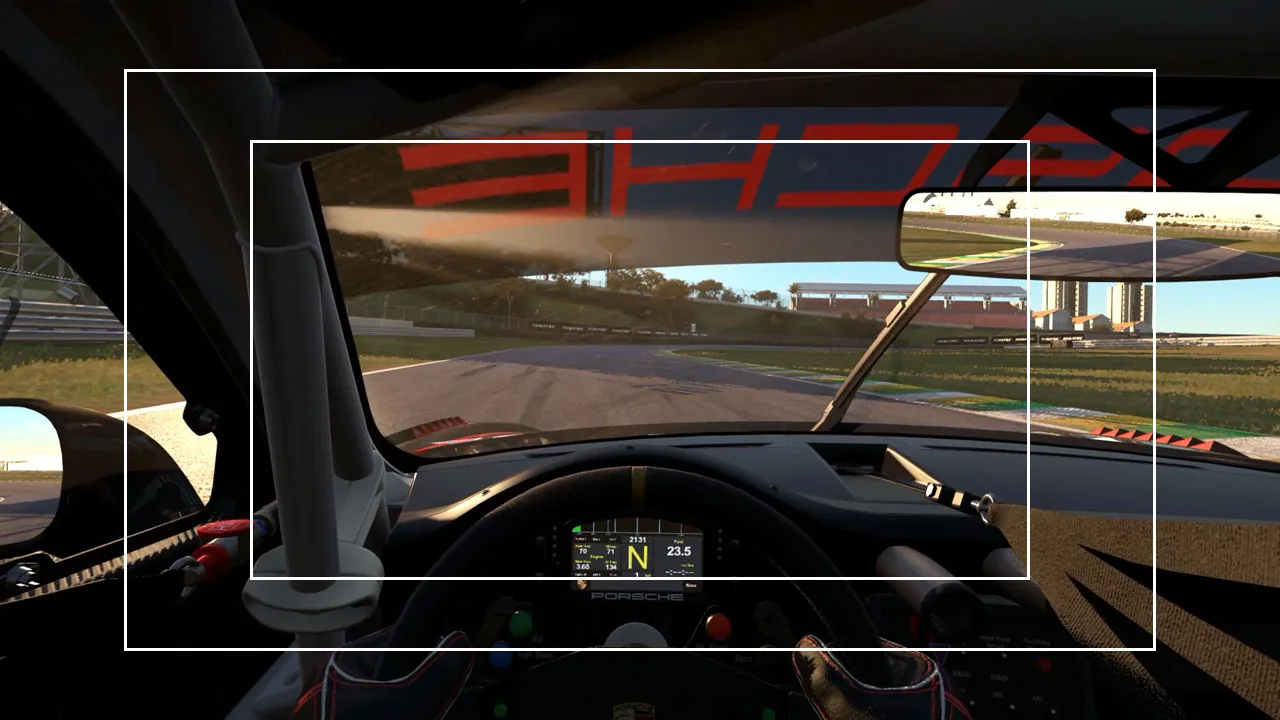
Wrong field of view is the single most common hidden mistake in sim racing. Run it too wide and the world looks like a fish-eye lens — braking points rush at you, speed feels fake, and your references never settle. This sim racing FOV calculator gives you the correct horizontal and vertical field of view for your exact monitor and seating distance, then converts it to the right value for iRacing, Assetto Corsa, ACC, Assetto Corsa Rally, Automobilista 2, Le Mans Ultimate and more.
Measure the distance from your eyes to the screen with a tape measure (not your arm), enter your monitor details, and copy the value into your sim. That's it — a realistic FOV is free lap time.
Your setup
Tape-measure from your eyes to the screen, seated in your driving position — distance is by far the biggest factor in the result.
Measured at the seam, where each side monitor meets the centre one — the angle you can see between the two panels, not the angle of the mounting arms. Pick the nearest, then set the same angle in your sim.
| Game | Uses | FOV |
|---|---|---|
| iRacing On triples: Combined value across all three screens — the full span, not one panel. It depends on how far your side screens are angled in, which is why triple users run 150-190° where a single screen is nearer 60°. | H-FOV | — |
| Assetto Corsa On triples: Unchanged — vertical FOV doesn't widen across side-by-side screens. | V-FOV | — |
| Assetto Corsa Competizione On triples: Unchanged — vertical FOV doesn't widen across side-by-side screens. | V-FOV | — |
| Assetto Corsa EVO On triples: Unchanged — vertical FOV doesn't widen across side-by-side screens. | V-FOV | — |
| Assetto Corsa Rally The single-screen setting is an OFFSET, not an angle: 0 means 60°, so +10 is 70°. Move it until the horizontal FOV shown top-right matches this. On triples: Combined value across all three screens, the same figure iRacing wants. You do not type it here though — the in-game triple-screen app takes your monitor width, bezel, eye distance and the angle your side screens are turned in, and derives it. Use this number to check what it lands on. | H-FOV | — |
| Automobilista 2 On triples: Single-screen value even on triples — the Madness engine wants one panel's figure, the opposite of iRacing despite both being H-FOV. | H-FOV | — |
| Le Mans Ultimate On triples: Unchanged — vertical FOV doesn't widen across side-by-side screens. | V-FOV | — |
| Euro Truck Simulator 2 / ATS On triples: Combined value — it stretches one image across all three screens instead of rendering them separately, so the wide figure is the one to enter. | H-FOV | — |
| DiRT Rally 1 / 2 Config-file value: the engine halves it internally, so enter double the vertical angle. On triples: Unchanged — it reads a vertical figure, which side-by-side screens don't widen. | V-FOV ×2 | — |
| EA Sports WRC In-game slider from 0 to 100, where 0 is 18° vertical — not degrees. On triples: Unchanged — the slider maps to a vertical angle, which triples don't widen. | Slider | — |
| F1 24 / F1 25 In-game slider from -20 to +20, where 0 is 77° horizontal — not degrees. On triples: No native triple-screen support. | Slider | — |
If the correct value feels zoomed-in at first, that's normal — true scale always looks narrower than the wide game defaults, because a single screen can't give you peripheral vision. Drive a few sessions before judging it; your braking points and sense of speed will sharpen. If you still can't live with it, widen it a few degrees knowingly rather than doubling it.
Built by GitGud Racing Academy. The single-screen figure is exact geometry — FOV = 2·atan(half screen width ÷ eye-to-screen distance) — the same formula every accurate calculator uses; small differences you may see between sites come down to rounding and input assumptions, not the maths. Credit to the open FOV calculators that paved the way: simracingcockpit.gg and dinex86's Modern FOV Calculator.
How to use the FOV calculator
- Aspect ratio & screen size — the physical shape and diagonal of one monitor.
- Distance to screen — eyes to the centre of the screen, measured with a tape. This is the biggest variable, so get it right.
- Single or triple — on triples the calculator gives each sim its own answer, because the convention does not decide it: iRacing takes the combined span across all three panels while Automobilista 2 takes the single-screen figure — both are horizontal-FOV sims, so the convention tells you nothing. Vertical-FOV sims (Assetto Corsa, ACC, AC EVO, Le Mans Ultimate) keep the single-screen value because vertical FOV doesn’t change across side-by-side monitors, and a sim stretching one image over all three (ETS2/ATS, or Surround without native support) takes the combined figure too. You also tell it how far your side monitors are angled in, because that is what decides the combined figure — the same angle your sim asks for.
- Curved & bezel — a curve widens the usable view slightly (the figure is an estimate); bezel thickness affects the triple-screen geometry.
Then find your sim in the table and copy that value into its FOV setting.
One thing that catches people out: this number is derived from your eye-to-screen distance, so it stops being correct the moment you move your seat. If you are still settling the rig itself, set your seating position first and calculate the FOV afterwards — otherwise you will be doing this twice.
The same goes for the screen. If the monitor sits on a desk while your seat sits on a rig, the distance shifts every time either one moves; a monitor mount fixed to the rig keeps it where you measured it. What to check before buying a cockpit covers mounts too. Disclosure: that is a partner page. It carries a 5% Sim-Lab code, and I may earn a commission if you buy through its link, at no extra cost to you.
iRacing FOV calculator: how to set the correct field of view
iRacing asks for horizontal FOV, in degrees. Take the number on the iRacing row of the table above and use it exactly — no conversion, no halving. It is already the value iRacing wants for the monitor and seating distance you entered.
On a single monitor that number is the horizontal span of your one screen, and it will be smaller than you expect: a 27″ 16:9 at a normal desk distance lands somewhere around 55–70°, against iRacing's default of roughly 80°. The default is not a recommendation — it is a value chosen to look acceptable on any setup, and on yours it is almost certainly too wide.
On triple screens iRacing wants the combined span across all three panels, not one panel's figure. That is why triple users run numbers past 150° where a single screen sits nearer 60°. This is the single most common iRacing FOV mistake, and it is worth being precise about: Automobilista 2 asks for the opposite — the single-screen value — despite both sims measuring horizontally. The convention does not tell you which; the sim does. Set Angle between screens to the angle the calculator shows alongside the FOV — the same one you picked for your rig. The two numbers are a pair: the combined span only describes your screens if the sim knows how they are turned.
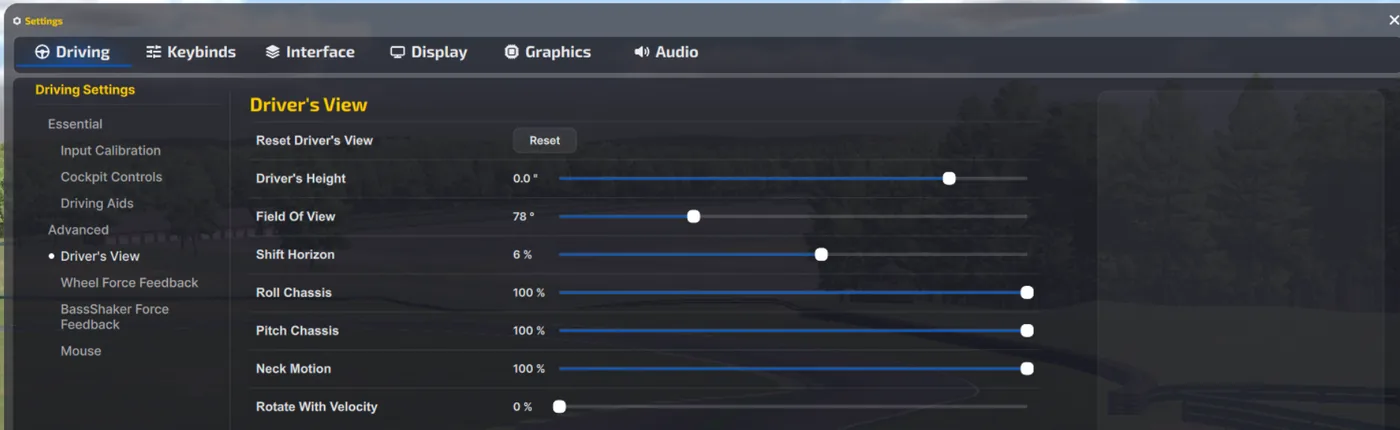
Where to change it: in iRacing open Settings → Driving, then Driver’s View under Advanced. Field Of View is the third slider, and it ships at 78°. On triples, set the angle between your screens to the angle the calculator shows alongside the FOV, in iRacing’s monitor configuration. Set your seating position first — Ctrl+F12 in the car — so eye height, wheel and mirrors are right, then set FOV. Doing it the other way round means re-doing both.
Measure the distance properly. Eyes to the centre of the screen, with a tape, sitting as you actually sit when racing. Viewing distance moves the answer more than screen size does, so a 10 cm guess is the difference between a correct FOV and another wrong one. On triples, measure one panel and pick how far your side screens are angled — the calculator handles the geometry and bezels from there.
If the correct value feels too narrow, that is the expected reaction — you have spent months learning distance and speed at the wrong scale, and the honest one feels claustrophobic for a session or two. Do not widen it back. If it is genuinely unusable, move your seat closer to the screen rather than raising the number: that keeps the world at true scale and gives you more of it. Give it three sessions before you judge. What you are buying is braking points that stay where you left them.
Assetto Corsa Rally FOV: an offset slider, not a degree value
Assetto Corsa Rally does not ask you for a field of view in degrees. The setting is called Field of view offset and it starts at 0, which means 60°. Add 10 to the offset and you are running 70°. The horizontal FOV it resolves to is displayed at the top right of the screen while you drag it, so the practical method is simple: move the offset until that readout matches the Assetto Corsa Rally figure in the table above. It is the same horizontal convention iRacing uses, so the number does not need converting — only the slider does.
On triple screens it works the other way round, and this is the good news. Instead of a slider you use the in-game triple-screen app, which asks for your monitor width, bezel thickness, eye distance and the angle your side monitors are turned in — then derives the field of view for you. That is the same set of measurements this calculator works from, so the two should agree, and a mismatch means one of the four numbers you typed is wrong. It is also a useful confirmation that the side-screen angle genuinely belongs in triple-screen FOV maths: Kunos asks for it because three panels barely turned in cover far less of your vision than three wrapped around you. A rig measured at 32″ 16:9, 60 cm away with the sides at 35° lands on roughly 157° — the same combined figure iRacing wants for that setup.
Still deciding what to race on rather than what to set it to? The sim racing monitor setup visualizer shows the same lap on a single screen, an ultrawide, a super ultrawide and triples, so you can see the visibility difference before you buy anything.
Why correct FOV makes you faster
A realistic FOV renders the world at true scale, so distances, closing speeds and apexes match reality. That's what lets you build repeatable braking and turn-in references — the foundation of consistency. Too wide a FOV (the default in most sims) shrinks everything and tricks you into braking early and carrying less speed. It feels faster; it's slower.
Once the picture is honest, whatever the car still does wrong is real — and it is either the setup or the driving. If it won't turn in, won't put the power down or feels nervous over kerbs, the sim racing setup troubleshooter gives you the setup changes to test in order, by corner phase, and says plainly when the first fix is technique rather than another click. When it is technique, the twelve driving techniques every driver should master start with vision — which is the one a correct FOV makes possible.
Horizontal vs vertical FOV — why the same setup gives two numbers
Because your screen is wider than it is tall, the horizontal angle is always larger than the vertical one. Sims don't agree on which they ask for: some use horizontal degrees, some vertical, and a few use a halved or scaled value. That's why "45" in one sim is not "45" in another — you have to use the value for your sim. The table above does that conversion for you. (Game FOV conventions can change with updates; double-check against your sim's current options if a value looks off.)
Sim racing FOV calculator FAQ
What is the correct FOV for sim racing?
The correct FOV is the angle that renders the cockpit and track at true real-world scale for your exact screen size and seating distance, so distances and closing speeds match reality. There is no single magic number: it depends entirely on how big your monitor is and how far your eyes sit from it. Measure that distance with a tape, enter your monitor details into the calculator above, and use the value it gives for your specific sim.
How do I calculate FOV for a single monitor?
Measure the straight-line distance from your eyes to the centre of the screen with a tape measure, not by guessing or using your arm, since this is the biggest variable. Enter that distance plus your monitor's aspect ratio and diagonal size into the calculator above. It returns the correct horizontal and vertical angle and converts it to the right number for each sim. Sitting closer to the screen allows a wider correct FOV; sitting further back narrows it.
Why does sim racing feel slower with the correct FOV?
A wide default FOV shrinks everything on screen, which fools you into thinking you have more time, so you brake early and carry less speed; it feels fast but is actually slower. The correct FOV renders the world at true scale, so apexes and braking zones arrive at realistic distances. It can feel claustrophobic and quick at first, but that accuracy is what lets you build repeatable references. Give it a few sessions before judging it. If after that you still cannot tell whether the new FOV or your technique is costing the time, that is exactly what a lap review separates, and it is the core of our sim racing academy.
What FOV should I use for ACC and iRacing?
There is no universal degree value because the right number depends on your monitor size and seating distance, and these two sims even read FOV differently. ACC uses a vertical-FOV convention, while iRacing uses horizontal, so the same physical setup produces two different numbers. Enter your screen and distance into the calculator above and copy the value it lists specifically for ACC or for iRacing. Do not reuse one sim's number in the other, as that is the classic mistake.
Is triple screen better than a single monitor for FOV?
Triple screens let you run a correct, true-scale FOV while still seeing your mirrors and apex through the side glass, which a single monitor cannot do without feeling like a narrow letterbox. On a single screen the correct FOV is often uncomfortably tight, so many drivers compromise. Triples remove that trade-off, but the number you enter is where almost everyone goes wrong, and the horizontal-versus-vertical convention is no guide to it. iRacing wants the combined span across all three panels, which is why iRacing triple users run figures past 150 degrees where a single screen is nearer 60. Automobilista 2 is also a horizontal-FOV sim with native triple rendering and wants the opposite: the single-screen value. Vertical-FOV sims such as Assetto Corsa, ACC and Le Mans Ultimate keep the single-screen number, because vertical FOV does not widen when you add screens side by side. The table above gives each sim its own answer. The combined figure depends on how far your side monitors are turned in, which is why the calculator asks: three panels barely angled cover far less than three wrapped around you, so pick the one that matches your rig and give your sim the same angle.
How far should I sit from my monitor for sim racing?
There is no single ideal distance, because the FOV you can run depends on the combination of monitor size and seating distance, not the distance alone. As a rough guide, many sim racers sit roughly an arm's length from a single 27 to 32 inch screen, but you should measure your actual eye-to-screen distance with a tape and feed it into the calculator above. Sitting closer simply lets you run a wider correct FOV without the picture shrinking.
This guide is part of the free library at GitGud Racing Academy — an online sim racing academy built around weekly lap reviews, structured courses, drills and training tools.
Train this the right way
Reading is step one. Build it into muscle memory with structured, car-specific courses and personal lap reviews from a coach — inside the Academy.
Join the Academy · $39.99/mo incl. VAT