Fanatec CSL DD: Avoiding the Common Issues
If you own a Fanatec CSL DD, you have probably already seen posts about common Fanatec CSL DD issues — wheels disconnecting mid-race, strange noises from the base, cracked plastic on the quick release. Before you throw your equipment out the window, hear me out: most of these problems are preventable, and once you know what to look for you can drive thousands of hours without a single incident.
In this article I am going to walk you through every issue I have personally encountered or seen reported by the community — the plastic quick release adapter, the shaft slipping out of the base, the ring-alignment rattle, and the creaking and graining that a few drops of grease will remove — along with the exact steps to prevent and fix each one.
Nearly all of it traces back to one place: the joint between the shaft, the clamp that holds it, and the quick release your wheel bolts to. Once you understand that, a clunking noise, a wheel that vanishes mid-race and a creak under load stop looking like three separate faults and start looking like one part of the base telling you three different things.
The Plastic Quick Release Adapter: What You Need to Know
The CSL DD ships with a plastic quick release (QR) adapter, and that is where the majority of issues start. The price point is genuinely great for what you get, but plastic is plastic — and plastic can break, especially if you treat tightening the screws as a warm-up for your gym session.
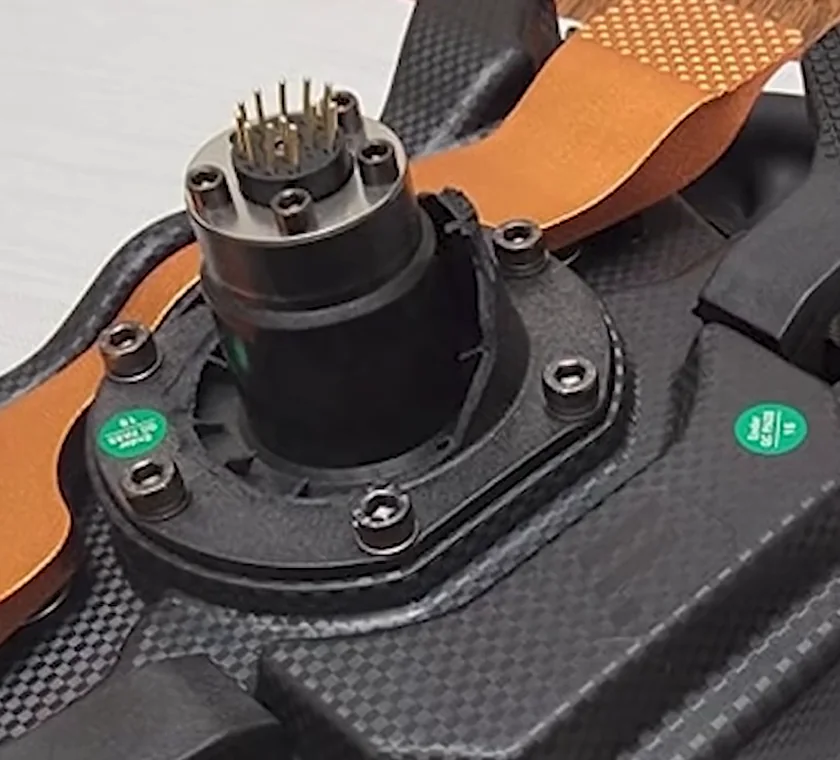
If you want a long-term relationship with this thing, you have to be gentle. Over-tightening is the single fastest way to crack the adapter and ruin your day.
Cracking does not happen to every user — Fanatec would not ship a product that breaks out of the blue at scale — but it does happen to a small proportion of users, and user behaviour is a big factor in whether you land in that group.
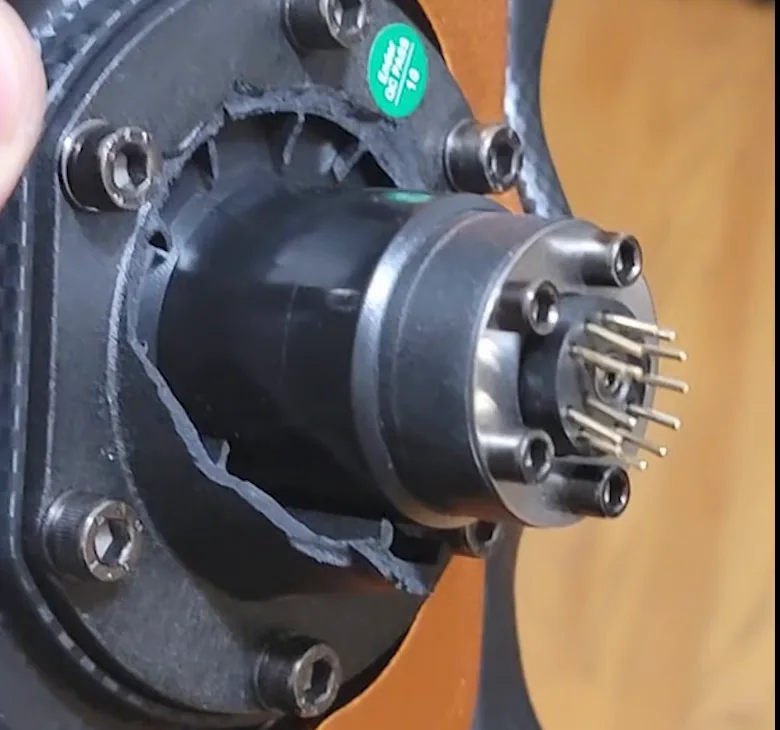
How to Avoid Cracking the Plastic QR
Plastic QR Crack Prevention Checklist
- Read the manual and tighten the five wheel screws to spec. Do not go beyond the recommended torque.
- Do not over-tighten the locking mechanism. Over-tightening makes it harder to change wheels and stresses the plastic every time.
- Inspect the adapter regularly for hairline cracks. A small crack you catch early is a warranty claim; a small crack you ignore is a broken wheel mid-race.
- If you see a crack, stop using the wheel immediately. Contact Fanatec support — they will ship you a replacement adapter free of charge.
How to Stop CSL DD Creaks and Graining: Grease the Quick Release
If you use the plastic QR Lite adapter and you feel knocks, creaks, or a gritty graining through the wheel at high force feedback moments, there is a five-minute fix that costs nothing and carries no risk. It removed the noise on my own base completely and, more importantly, made the force feedback feel noticeably smoother.
The cause is the mating surfaces of the plastic adapter wearing against the metal shaft. Look closely at a QR Lite that has been used for a while and you can see the contact faces starting to deteriorate. On mine the giveaway was a sticky black residue on the shaft every time I changed wheels — plastic being shaved off the adapter. In the car it felt like a quick snap followed by a noise.
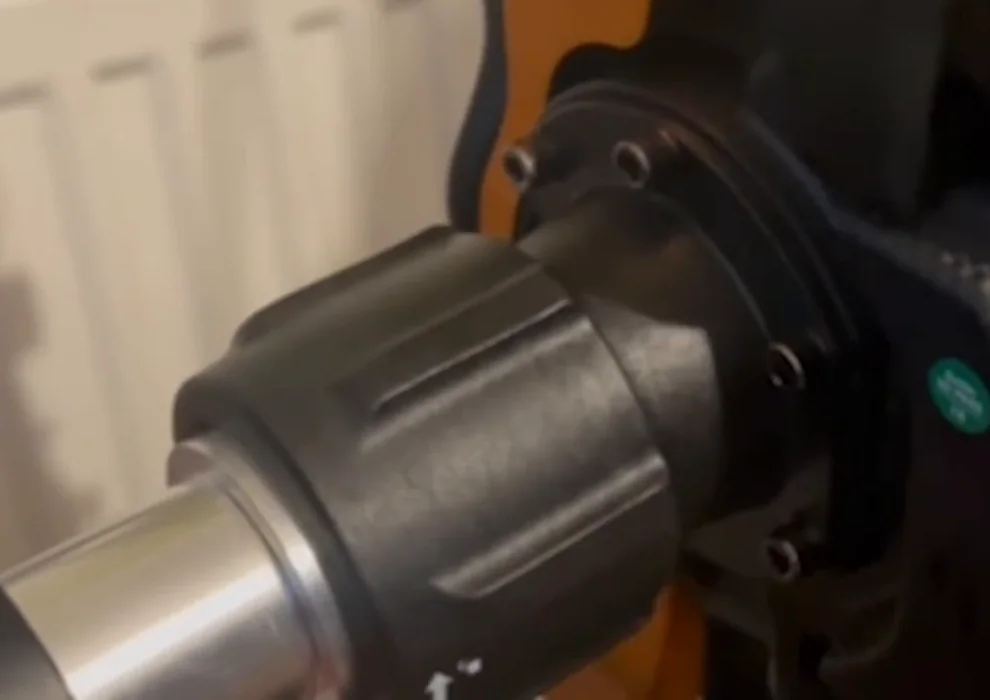
Greasing the QR Lite: the four steps
- Apply grease to the shaft. Be generous here — you want the contact faces properly covered, not dusted.
- Add a drop or two inside the adapter. Just a drop or two, and keep it off the pins — those are electrical contacts and grease has no business on them.
- Reconnect the wheel and do not over-tighten the locking mechanism. The same rule as everywhere else on this base: snug, not heroic.
- That is it. No disassembly, nothing to break, and if it turns out your noise came from somewhere else you have lost five minutes and gained a better-lubricated quick release.
Whether it extends the life of the adapter is something only time will answer honestly, but it plainly reduces the wear that was producing that black residue. Credit for this one goes to Sam, who suggested it in the comments on an earlier video — it is a better fix than anything I had tried.
Shaft Slippage: Why Your Wheel Can Disconnect Mid-Race
This one I experienced first-hand. During a race my wheel suddenly disconnected — full loss of force feedback, no buttons responding, and a big clunky noise that made me think the base itself had died. After inspecting it carefully I found that the shaft had moved a few millimetres out of the base. Loosening the clamp bolt and pushing the shaft back in fixed it instantly.
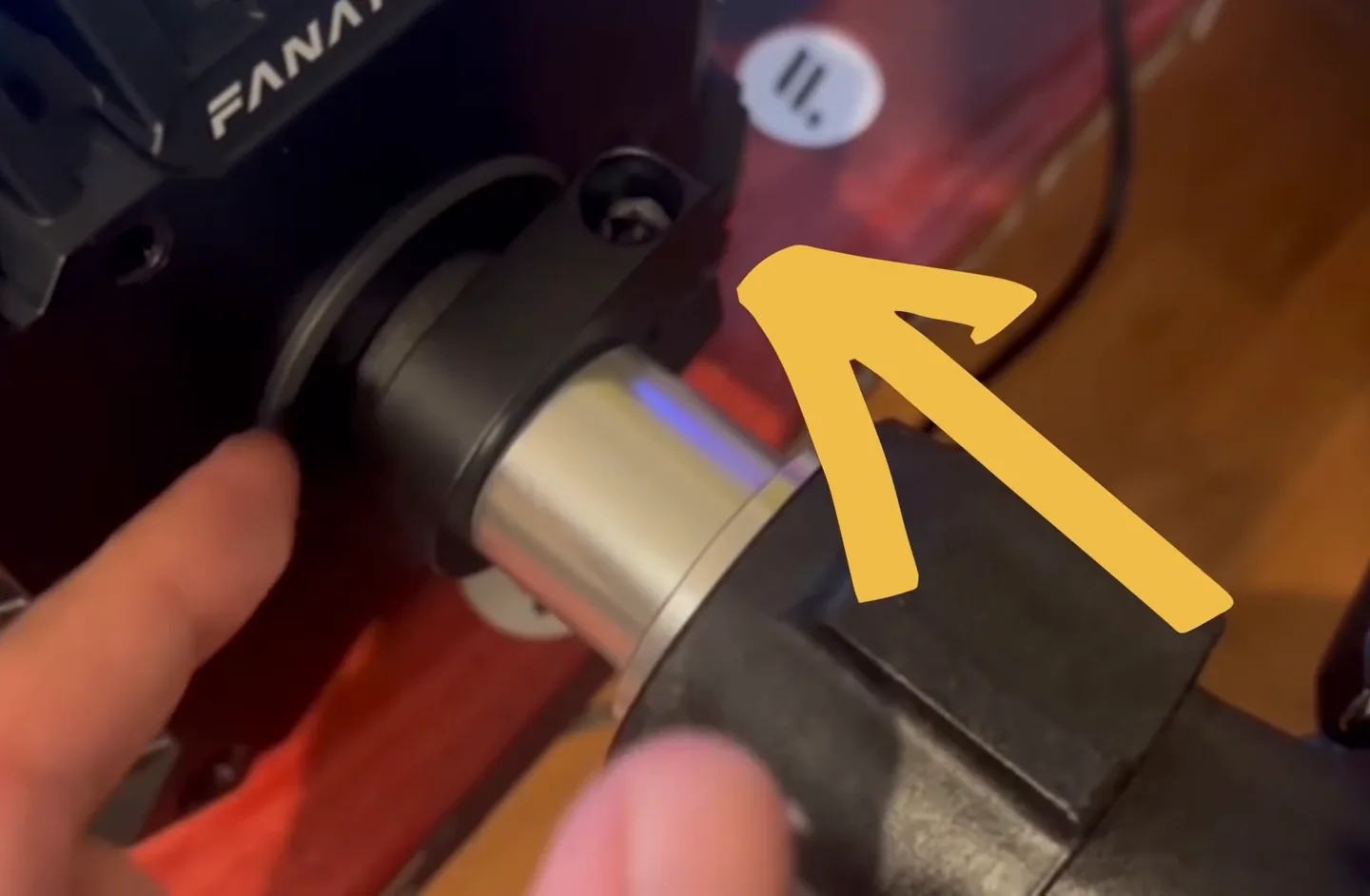
It warned me first, and I ignored it. Earlier in the same race I went for a downshift and nothing happened — once, on one corner, and then it worked again for laps afterwards. That is the sign. A shaft that has started to migrate breaks contact intermittently long before it disconnects for good, and it shows up as a button or paddle that misses an input and then behaves. If a single downshift goes missing and everything seems fine after it, check the shaft that evening rather than after the next race.
How to confirm it is the shaft and not software: open FanaLab and the Fanatec control panel. If the wheel is not detected in either of them, the problem is the physical connection through the shaft, not a driver or a firmware state. Unplugging, replugging and restarting both the PC and the base will do nothing — I tried all of that before I found the real cause.
Why the Shaft Moves
There are two main causes, and if you are not aware of both, it will eventually happen to you:
- Changing wheels frequently. Every time you pull the wheel off the plastic QR, there is a small amount of force pulling the shaft outward. This is cumulative — over many wheel swaps, the shaft migrates out millimetre by millimetre until it reaches a threshold and snaps loose.
- High-torque, high-force-feedback moments. Multiple users have reported that during hard braking combined with a sharp downshift into a 90-degree corner, the physical force on the wheel can pull the shaft slightly outward. This has been flagged most often with the plastic QR, but the underlying shaft movement risk exists regardless of which QR adapter you use — it also applies to the DD1 and DD2 since they share the same shaft design.
How to Prevent and Fix Shaft Slippage
- Inspect the shaft regularly. If you can see a noticeable gap between the shaft and the clamp, act immediately.
- To fix it: loosen the C-clamp bolt, push the shaft a few millimetres firmly back into its correct seated position, then re-tighten. No tools beyond a hex key are required.
- Tighten it properly. The recommended torque on the C-clamp bolt is 50 Nm, which is far more than most people expect — this is the one bolt on the base you do not need to be gentle with. Nervous under-tightening is exactly what lets the shaft migrate in the first place.
- Check for force feedback clipping in heavy braking zones. If your FFB is maxing out on those hard 90-degree corners, lower the overall force feedback strength slightly so you are not physically yanking the wheel toward you under load.
Strange Noises From the CSL DD Base
There are two distinct noises worth understanding, and they have completely different causes.
Noise From the Plastic QR on Hard Hits
If you hear a clunking or creaking noise from the plastic QR during hard sudden force feedback moments, that is normal behaviour. The adapter flexes slightly under load. It sounds alarming, especially the first time, but from everything I have seen it does not indicate imminent failure — as long as you have already ruled out cracks and you are not over-tightening.
Ring Alignment Rattle on the CSL DD Base
A different rattle can come from the ring that holds the shaft in place inside the base. This is specific to the CSL DD and is caused by the dents in the shaft not sitting perfectly aligned with the holes in the ring.
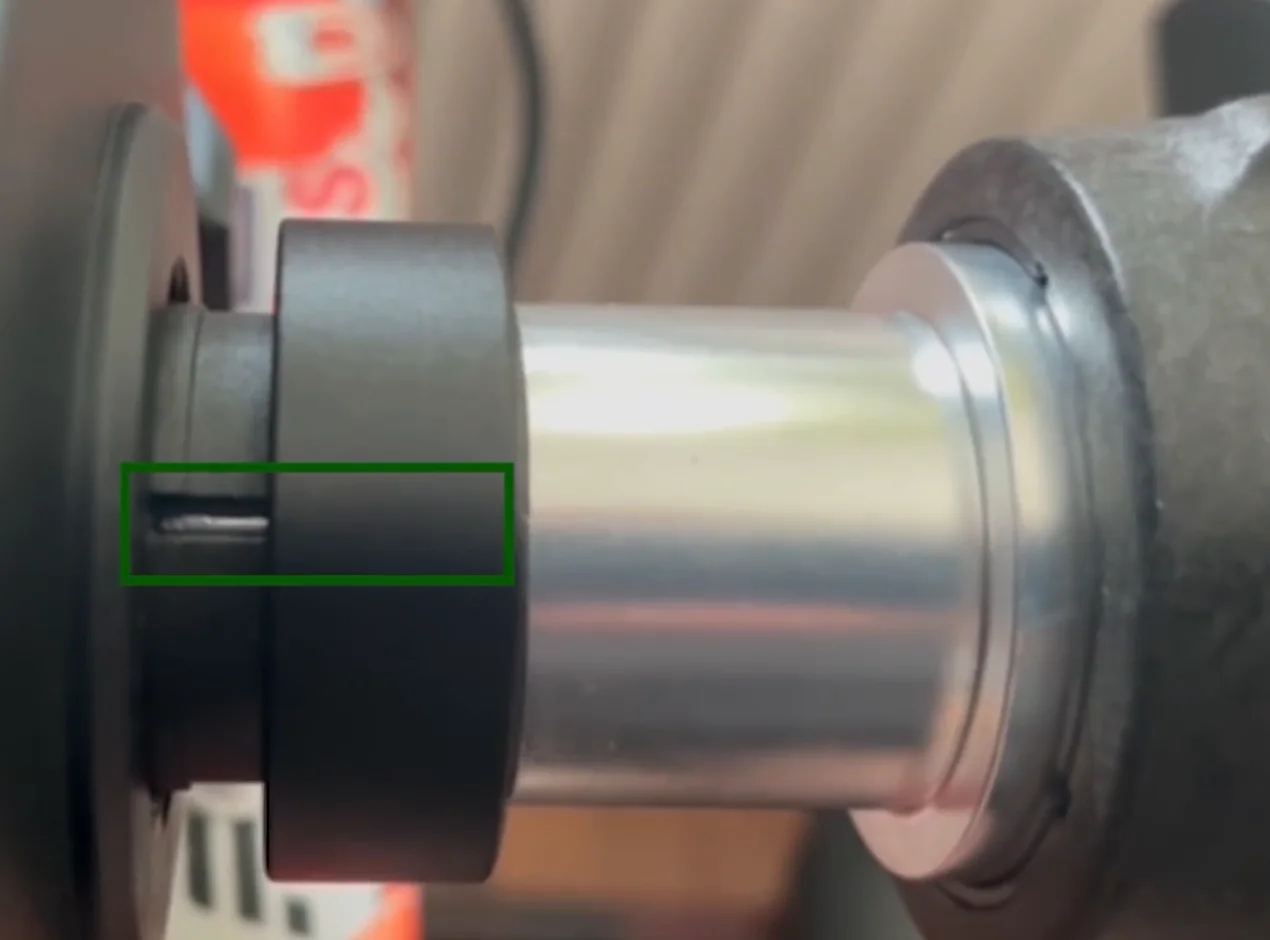
How to Fix the Ring Alignment Rattle
- Check whether the dents in the shaft are perfectly aligned with the corresponding holes in the retaining ring. Look at both sides of the clamp — front and back should each show the ring, the clamp and the shaft's dent lining up. An offset on one side only is easy to miss from the front.
- If they are not aligned, loosen the clamp bolt and rotate the shaft until the dents and holes line up correctly.
- Re-tighten the clamp bolt.
- You do not need to pull the shaft out of the base to do this. The fix is a small rotation and re-clamp — no disassembly, no risk. If the dents genuinely will not line up, you can pull the shaft and push it back; there is no harm in it.
- If the rattle survives all that, it may be coming from the quick release rather than the base. Try the grease fix above before assuming the base is at fault.
Should You Upgrade to the ClubSport Quick Release?
The all-metal ClubSport QR is roughly $100 USD. The honest answer is: you probably do not need it right now. If you are aware of the plastic QR's behaviour — handle it gently, inspect it regularly, manage your FFB levels in heavy braking zones — you can prevent the issues that lead people to buy the upgrade in the first place.
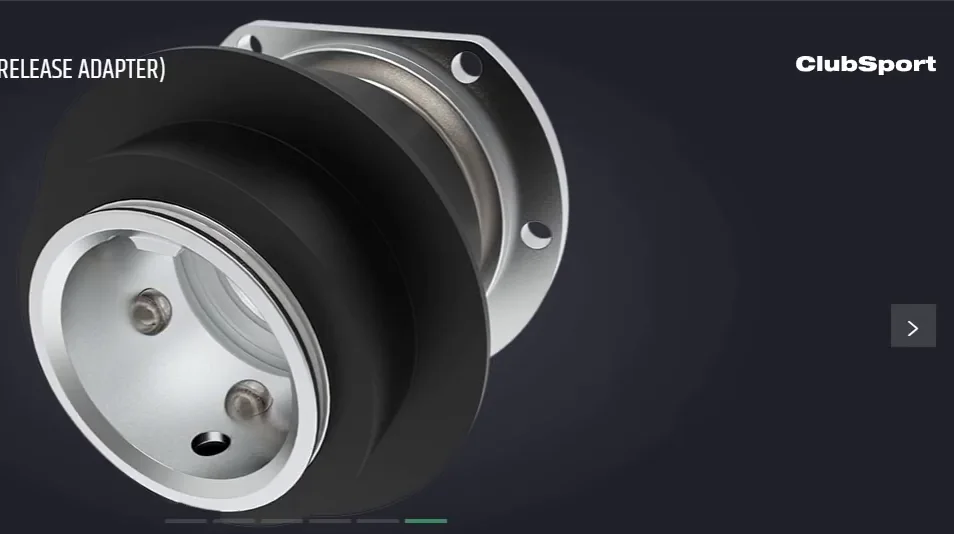
There is also a new quick release system from Fanatec coming soon. My advice is to keep using the plastic QR for a few months, see what the new system brings to the table, and then decide whether it is worth spending the money. Buying the ClubSport QR now only to replace it again shortly after would be a waste.
The bottom line: the CSL DD is an excellent wheel base for the price, and none of the issues above are reasons to abandon it. They are reasons to be deliberate — inspect your hardware regularly, respect the torque limits, watch your FFB settings in braking zones, and you will race without interruption. Five minutes of maintenance now saves an entire race later.
Fanatec CSL DD problems FAQ
What is FanaLab and do I need it for the Fanatec CSL DD?
FanaLab is Fanatec's free Windows tuning app that sits on top of the base driver. It lets you adjust force feedback settings, save per-game profiles, and control wheel-rim displays and LEDs. You do not strictly need it to drive, since you can set everything from the base tuning menu, but FanaLab makes it far easier to manage profiles and dial in FFB per title. Install the Fanatec driver first, then add FanaLab.
How do I update the firmware on my Fanatec CSL DD?
Download the latest Fanatec driver package for the CSL DD and run the installer, which includes the firmware manager. Connect the base by USB, open the Fanatec Control Panel, and update the base firmware, then the wheel and any peripherals if prompted. Do not unplug or power off mid-update. Keeping firmware current fixes many disconnect and detection bugs, but note your settings first since some updates reset the tuning menu to defaults.
Why is my Fanatec CSL DD making a clunking or knocking noise?
Near the centre, during quick corrections, a clunk usually means the shaft is not seated squarely in the C-clamp. Look at the retaining ring that holds the shaft and check it lines up with the clamp and with the dents in the shaft itself, on both the front and the back of the clamp. If there is an offset, loosen the clamp bolt, realign it, and tighten it back up. You do not need to remove the shaft, and there is no risk in trying. If the noise only appears on hard force feedback hits rather than near the centre, it is more likely the plastic quick release flexing, and greasing the adapter usually removes it.
Can I grease the Fanatec quick release?
Yes, and on the plastic QR Lite it makes a real difference. The symptom is knocks, creaks or a gritty graining through the wheel under load, often with a sticky black residue appearing on the shaft, which is plastic being worn off the adapter. Apply grease generously to the shaft, add a drop or two inside the adapter while keeping it well away from the electrical pins, then reconnect the wheel without over-tightening the locking mechanism. It removes the creaking and makes the force feedback feel smoother. There is no disassembly and nothing to damage.
How tight should the CSL DD C-clamp bolt be?
The recommended torque on the C-clamp bolt is 50 Nm, which is considerably more than most owners expect. This is the one fastener on the base you do not need to treat gently, and it is the opposite of the wheel-side screws and the quick release locking mechanism, where over-tightening is what cracks the plastic. Under-tightening the C-clamp is precisely what allows the shaft to migrate out of the base over many wheel changes, which is the most common cause of a wheel disconnecting mid-race.
Why does my Fanatec CSL DD keep disconnecting mid-race?
The most common mechanical cause is the shaft creeping a few millimetres out of the base over many wheel swaps or under hard braking loads, which kills force feedback and button input. Loosen the clamp bolt, push the shaft fully home, and re-tighten. If the wheel is seated correctly, suspect a USB issue instead: try a rear motherboard USB port, avoid hubs, update the driver and firmware, and check the power supply is firmly connected.
What FFB settings stop the CSL DD from clipping?
Clipping happens when the in-game force exceeds what the base can output, so detail flattens out at the peaks. The fix is to lower the overall gain until the strongest forces stop saturating. Keep the base FFB strength out of its maximum range during heavy braking so you are not physically yanking the wheel and stressing the shaft. Start the in-game gain conservatively, then raise it until kerbs and slides feel strong but never go fully solid.
What are the best CSL DD FFB settings for ACC and iRacing?
There is no single magic number, since it depends on whether you have the 5Nm or 8Nm base and on personal taste, but the approach is the same. In ACC, set the in-game Gain so the wheel never fully maxes out, then raise Minimum Force only if light forces feel dead. In iRacing, use the Auto button to set strength, then drop it slightly if bumps or kerbs clip. Keep base damper and friction modest so the wheel stays informative.
Should I upgrade the CSL DD to the ClubSport QR or buy a stronger base?
For most drivers, neither is urgent. The all-metal ClubSport quick release costs around 100 dollars and mainly buys peace of mind: if you handle the plastic QR gently, inspect it, and manage FFB in braking zones, you can avoid the cracking and slippage that push people to upgrade. A stronger base like a DD1 or DD2 only makes sense if you genuinely want far more peak torque. With a new QR system coming, waiting a few months is sensible.
This guide is part of the free library at GitGud Racing Academy — an online sim racing academy built around weekly lap reviews, structured courses, drills and training tools.
Train this the right way
Reading is step one. Build it into muscle memory with structured, car-specific courses and personal lap reviews from a coach — inside the Academy.
Join the Academy · $39.99/mo incl. VATWatch the full video on YouTube