Sim Racing Monitor Setup: Compare Single, Ultrawide and Triples
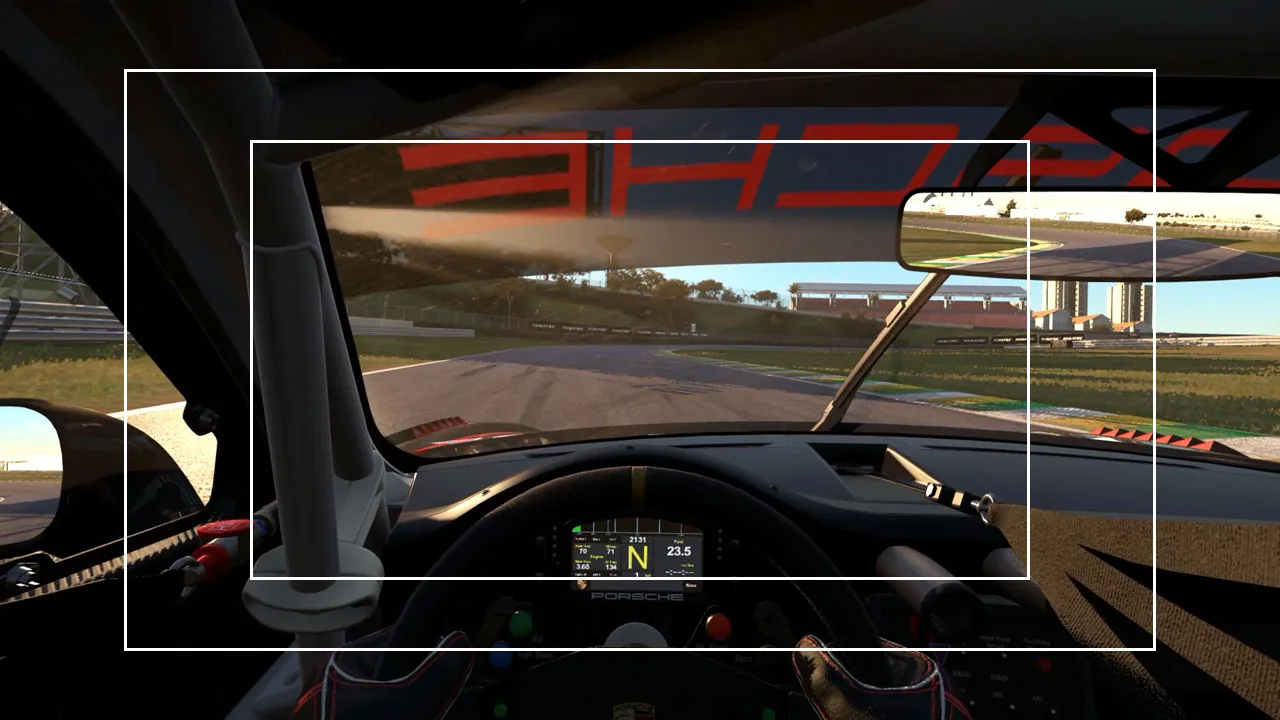
The right sim racing monitor setup depends on four things: how much space you have, how much side vision you want, what you can mount, and what your graphics card can drive. A single screen is the cheapest and most compact. An ultrawide is the easiest step up. A super ultrawide gets close to triple-screen coverage on one panel. Properly angled triples show the most, and ask the most of your rig and GPU. Use the visualizer to see the difference, then the table below to pick, and the setup steps to position it.
- Single ~64°
- Ultrawide ~108°
- Super ultrawide ~150°
- Triples ~188°
-
Focused forward view One 16:9 panel, typically 27in to 32in
A car drawing alongside leaves your screen long before it leaves your mirror.
-
More natural peripheral awareness One 21:9 or 32:9 panel, 34in to 49in
The extra width lands where it matters: corner entry, mirrors, the car about to be beside you.
-
Wraparound coverage, one screen One 32:9 panel, 49in to 57in
Close to triple coverage from one panel — no bezels across the track, one cable.
-
Maximum peripheral visibility Three 16:9 panels, angled inward around you
Angled correctly, they cover close to your natural vision. Side-by-side racing becomes readable.
This shows the relative visibility of each setup. Your own field of view depends on panel width and how far you sit from it — calculate your exact FOV →
What the visualizer shows, and what it assumes
- Illustrative footage, cropped, not zoomed. All four views play one wide driving clip at the same moment. Each setup shows a wider slice of that same frame, so the centre never changes size. It is a picture of relative width, not your sim rendered at your settings.
- Screen sizes are typical classes, not one model. Each view stands for the panel listed under it: one 16:9 screen, a 21:9 or 32:9 ultrawide, a 49″ to 57″ super ultrawide, or three 16:9 panels.
- No seating distance is assumed. The degree readout is an example that makes the four views comparable at a glance. Your real field of view depends on panel width and how far you sit from it.
- The triples view assumes the side panels are angled inward so the seams close. Laid flat in a row, the same three screens show much less (see triples).
Which sim racing monitor setup fits you?
| Setup | Pick it if | Space and mounting | GPU demand | Side visibility |
|---|---|---|---|---|
| Single 16:9, 27″–32″ | You race at a desk, on a budget, or want the simplest setup | Low; fits a desk | Lowest | Low |
| Ultrawide 21:9, usually 34″ | You want a clear step up from 16:9 without rebuilding anything | Medium; one panel | Medium | Medium |
| Super ultrawide 32:9, 49″–57″ | You want most of the triple view with no bezels, one cable and no alignment | Medium; a deep curve needs desk depth | High at 49″; very high at 57″ | High |
| Triples three 16:9 panels | Wheel-to-wheel racing is what you do and you accept setup work | High; a wide rig and a triple mount | High; scales with panel resolution | Highest, with two bezels in view |
What changes when you use a wider sim racing monitor?
A wider display is not the same picture made bigger. Set up correctly, it makes the sim render more of the world at the same scale — the car ahead stays exactly the size it was, and you simply see further to each side of it. That is why the visualizer crops rather than zooms.
The extra width buys you four specific things: seeing the apex before you have turned in, seeing a car that is halfway alongside rather than fully past, seeing your mirrors without looking away from the road, and a stronger sense of speed from the scenery moving in your periphery.
Single monitor for sim racing
A single 16:9 screen — usually 27″ or 32″ — is where most people start, and there is nothing wrong with it. It is the cheapest, it needs the least GPU, and it fits a desk. Its limit is side vision: at a geometrically correct field of view it shows roughly what you would see through a windscreen, so a car drawing alongside disappears from view while it is still very much there.
The mistake to avoid: do not compensate by widening the in-game FOV. That does not give you more vision, it shrinks everything on screen and pushes the track away from you, which costs you the braking references you were trying to protect. If a single screen feels narrow, that is the correct view being honest with you. Use the sim racing FOV calculator to find the right value for your screen and seating distance, and give it a few sessions before judging it. If you want to be able to look toward an apex that sits off the edge of a single screen, webcam head tracking does that — though it moves your view rather than widening it.
Ultrawide monitors for sim racing
A 21:9 ultrawide — 34″ is the common size — is the least disruptive upgrade there is. One cable, one panel, one set of settings, and noticeably more track either side of you.
It will not match triples for side coverage, because the extra width is still in front of you, on a flat or gently curved plane, while triples put screen where your peripheral vision actually points. But an ultrawide asks nothing of your rig, your desk or your patience, and for a lot of drivers that trade is the right one.
49″ and 57″ super ultrawide for sim racing
A 32:9 super ultrawide is a different experience from a normal ultrawide. A 49″ is effectively two 27″ screens side by side with no bezel down the middle. A 57″ is wider again, enough to start wrapping around you. This is the closest you get to triple-screen coverage from a single display: no bezels crossing the track, one cable, and none of the alignment work. The costs are the price, the desk depth a deep curve needs, and a pixel count that asks a lot of a GPU.
49″ vs 57″ ultrawide for sim racing
The 49″ is the safer buy and the easier fit. It is 32:9 at 1440p vertical, which most current mid-range and faster GPUs can drive, and it sits on a normal desk. The 57″ is 32:9 at 4K vertical — more than double the pixels, and more than three 1440p screens — and being wider, it wraps noticeably further around you at a similar curve.
Pick the 57″ if you want the closest thing to triples from one panel and your GPU can carry it. Pick the 49″ if you want most of the benefit for a lot less money and a lot less graphics card. The jump from 16:9 to 49″ is the big one; 49″ to 57″ is refinement.
Triple monitor sim racing setup
Three panels angled inward is still the most visibility you can buy, and the angle is not a detail — it is most of the point. Three screens in a flat row cover far less of your vision than the same three wrapped around you, because a panel turned toward you is both closer and less foreshortened.
How much less? Enough to change the answer. On one rig we measured directly — three 32″ panels, 60 cm from the driver — laying the same three panels flat in a row cost roughly a third of the view they gave angled in. Your own figures will be different, because they depend on how wide your panels are and how far back you sit, but the direction does not change: nothing about the monitors moved, only how they were turned.
One trap worth knowing before you buy: on a curved monitor there are two different inward angles and they can be nearly 30° apart. The angle you read where two panels meet is not the angle the panels actually end up pointing, because each one keeps bending across its own width. Both numbers are real, and using the wrong one is how people end up with a field of view that feels like sitting in the back seat. The FOV calculator asks for the one you can actually measure and explains the difference.
27″ vs 32″ triple monitors for sim racing
Once you have decided on triples, this is the next question, and the answer depends on how far back you sit. Three 32″ panels give you a bigger picture, but they need more distance to stay comfortable and a much wider rig to mount. Three 27″ panels are easier to place, cheaper and lighter on the mounts, and at a typical seating distance the field of view difference is smaller than the size difference suggests.
The trap is buying 32″ and then sitting at 27″ distance. Wide panels close to your face wrap a long way round, which sounds good until you realise the outer edges are somewhere your eyes never point. That is where people end up with the wrong angle and the wrong FOV at the same time.
Rule of thumb: if your rig lets you sit around 60 cm from the centre screen, 27″ is the easier setup to get right. If you sit further back — 70 cm or more, which a reclined formula-style seat usually means — 32″ earns its extra size. Either way, measure the distance first and let it decide, because the same panels at two distances are two different setups.
Ultrawide vs triple monitors for sim racing: which is better?
Neither is better in the abstract; they fail in different places. Triples win on side visibility and cost you setup work, space, two bezels and GPU headroom. A super ultrawide gives you most of that view with none of the alignment. A normal ultrawide is the answer when space or budget is the limit. If you are still unsure, switch between Super ultrawide and Triples in the visualizer and watch what appears and disappears at the edges — that is the actual decision.
How to set up a sim racing monitor, step by step
Screen position is the last step of a longer sequence, not the first. Do it in this order, because each step depends on the one before.
- Seating position. Where the screen belongs depends on where your head ends up, which depends on the seat. The seating position checker covers the order to set things in, and screens come near the end of it.
- Screen placement. Centre screen straight ahead, as close behind the wheel as your rig allows — sitting closer lets you run a wider correct field of view without the picture shrinking. On triples, angle the side panels inward around you until the seams close.
- Measurements. With a tape, from your eyes to the centre screen, sitting the way you actually sit when racing. On triples, note the inward angle too — on curved panels, the one the FOV calculator asks for.
- In-game configuration. Enter those measurements in the FOV calculator and set the value it gives for your sim. On triples, enter the screen angle in the sim as well, or the side views render at the wrong scale.
- Visibility check. On track, check you can see the mirrors, the apex on turn-in and a car alongside. If something is cut off, move the screen or the seat, not the FOV slider, and give the correct view a few sessions before judging it.
How far should your monitor be from your eyes?
There is no single right distance, because the number that matters is the ratio of screen width to viewing distance. Many sim racers sit roughly an arm's length from a 27″ to 32″ screen, but measure yours rather than guessing. Moving the screen toward you is often a bigger upgrade than buying a larger one.
Distance, screen width and (on triples) angle are one setting, not three: change any one and the correct FOV value changes with it. This page covers where the screens go. The sim racing FOV calculator turns your panel size, seating distance, screen count and angle into the figure for each sim — iRacing, Assetto Corsa, ACC, Assetto Corsa Rally, Automobilista 2 and the rest, each of which wants it in its own convention.
What monitor size is best for sim racing?
Size matters less than the combination of size and distance. A 32″ at 60 cm and a 27″ at 50 cm give you a similar view; what changes is pixel density and how much desk you need. As a rough guide, 27″ suits a desk-mounted setup, 32″ suits a dedicated rig with a bit of distance, and beyond that you are usually better off adding width than adding inches. A bigger screen at the same distance does widen your view — but only if you also set the wider FOV value it needs.
1080p vs 1440p vs 4K for sim racing
Resolution decides how clearly you can read distant detail — braking boards, a car's number, where a kerb actually ends. It does not change how much you can see; that is the display's width and your FOV.
1440p is the comfortable middle for most rigs. 1080p still races perfectly well and leaves GPU headroom for a high frame rate, which usually matters more than sharpness when you are judging a corner. 4K is lovely and expensive, especially multiplied by three.
How much GPU power do triple monitors need?
Three 1440p panels is roughly three times the pixels of one, and sim racing wants a high, stable frame rate more than it wants maximum detail. A steady 90 fps at medium settings usually beats a fluctuating 120 at ultra, because your inputs are timed against what you see.
If your GPU is the constraint, a 34″ or 49″ ultrawide is the honest recommendation: fewer pixels than triples, far more view than a single. A 57″ is not the GPU-saving option — it has more pixels than three 1440p panels.
Curved vs flat monitors for sim racing
On a wide single screen, curved genuinely helps — it keeps the edges of the picture a similar distance from your eyes, which reduces the stretched look a flat ultrawide gets at its extremes. The wider the panel, the more the curve earns its place.
On triples it matters less, because the angling already does that job. What curved panels do add on triples is the complication described above: the angle you measure at the seam is not the angle the panel ends up at, and the difference is big enough to matter.
Worth knowing before you buy any of it: a display upgrade only pays once the rest of the rig is not the limitation, and a correct field of view on the screen you already own changes more than most people expect. The sim racing upgrade order covers where screens sit in the queue.
Sim racing monitor FAQ
Are triple monitors better than an ultrawide for sim racing?
For peripheral visibility, yes. Three panels angled inward put screen where your side vision actually points, which is what makes judging a car alongside you possible rather than a guess. An ultrawide keeps all its extra width in front of you. The trade is real though: triples need more GPU, more space, alignment work and put two bezels across your view, while an ultrawide is one cable and no setup. If wheel-to-wheel racing is what you do, triples win. If you want most of the benefit with none of the work, a super ultrawide gets close.
Is a 49-inch ultrawide good for sim racing?
For many drivers, a 49-inch 32:9 is one of the best-value display upgrades in sim racing. It is effectively two 27-inch screens side by side with no bezel down the middle, so you get a large jump in side visibility without adding cables, alignment or a second GPU's worth of pixels. It will not match properly angled triples for coverage at the far edges, but it removes the single biggest complaint about a single screen, which is losing sight of cars beside you.
Is a 57-inch ultrawide better than triple monitors?
It depends what you are optimising for. A 57-inch super ultrawide is wide and curved enough to approach triple-screen coverage from one panel, with no bezels crossing the track and nothing to align. Triples still show you more at the extreme edges, because the side panels can be angled around you in a way a single curved panel cannot match. It is not the GPU-saving option either: it has more pixels than three 1440p panels. If you want maximum visibility, triples. If you want most of it with a far simpler setup and your GPU can carry it, the 57-inch is a genuinely strong alternative rather than a compromise.
What size monitor is best for sim racing?
Size on its own does not decide anything, because what matters is the combination of screen width and how far away you sit. A 32-inch at 60cm and a 27-inch at 50cm give you a similar view. As a rough guide, 27-inch suits a desk setup and 32-inch suits a dedicated rig with some distance. Past that, adding width usually helps more than adding inches, and moving the screen closer is often a bigger upgrade than buying a bigger one.
Is one 32-inch monitor enough for sim racing?
Yes, plenty of quick drivers race on one screen. What a single 32-inch cannot do is show you a car that is halfway alongside, so wheel-to-wheel racing takes more caution and more mirror work. The important thing is not to fix that by widening your in-game field of view, which shrinks everything and costs you braking references. Set the geometrically correct value for your screen and distance, and treat the narrow view as the honest one.
Do triple monitors give you a wider FOV?
Yes, but only if you tell the sim about them. Three screens physically cover far more of your vision than one, and the amount depends heavily on how far the side panels are angled inward: three screens in a flat row cover much less than the same three wrapped around you. You then have to enter both the field of view and the screen angle in your sim, because the sim renders flat planes and has no other way to know where your panels are. Enter the FOV without the angle and the world renders at the wrong scale.
How far should a sim racing monitor be from your eyes?
There is no single ideal distance, because the correct field of view depends on screen width and distance together rather than distance alone. Set your seat first, then measure yours with a tape, from your eyes to the screen, sitting exactly as you do when racing, and feed that into an FOV calculator. Sitting closer lets you run a wider correct field of view without the picture shrinking, which is why pulling the screen toward you is frequently a bigger improvement than buying a larger one.
This guide is part of the free library at GitGud Racing Academy — an online sim racing academy built around weekly lap reviews, structured courses, drills and training tools.
Train this the right way
Reading is step one. Build it into muscle memory with structured, car-specific courses and personal lap reviews from a coach — inside the Academy.
Join the Academy · $49.99/mo incl. VAT