The 15-Minute Braking Consistency Drill
A free session plan and tracking sheet from GitGud Racing Academy.
This session finds where your braking changes from one attempt to the next: the marker, the pedal or the limit. When you finish, you will know which one to practise next.
What you need. Any sim (iRacing, ACC, LMU, AMS2, AC) and any car. A telemetry or input overlay that shows brake % and ABS, if your sim has one. If it doesn't, watch the ABS light on the dash. Print the tracking sheet or keep it open beside you.
Before the clock starts
- One car, one track you know. Same setup throughout. The braking should be the only thing that changes.
- One braking zone. A straight, flat, heavy stop into a slower corner. Avoid downhill zones; they need a different technique. If the variance hunt in Why Your Lap Times Are Inconsistent found you a corner, use it.
- A brake marker. One fixed object: a distance board, a kerb, a change in the tarmac. Not "around the 100 board". The board itself. Pick a marker you can make every time, not the latest one you have ever made.
- A turn-in reference. A second fixed object where you start to turn.
- Quick repeats. Active reset if your sim has it. If not, repeat laps on a short track. On a long lap, ten attempts take more than 15 minutes, and that is fine.
- Delta bar off. No lap times. You are scoring the stop, not the lap.
The plan
| Minutes | What you do | Pass mark |
|---|---|---|
| 0–2 | Pedal check. In the garage, overlay on. Press the brake to about 20%, then release about 1% at a time to zero. Then press to 80% and hold it for 10 seconds. Watch for anything on the rig that moves. | Clean 1% steps all the way down, and a steady 1% that doesn't flicker to zero. 80% held for 10 seconds, firm but doable. Nothing moves. |
| 2–4 | Find the threshold. Drive out to your braking zone. The drive puts heat in the tyres. Brake in a straight line. Each stop, press a little harder, until the ABS triggers or a wheel locks. | You can name the brake % where ABS or lock-up starts. Write it on the sheet and set your pass band just under it. |
| 4–12 | Consistency block. Same zone, same marker. Active reset or repeat laps. Write your pass definition (below) before attempt 1. Ten scored attempts. Score each one as soon as it ends. | Three passes in a row. |
| 12–15 | Read the results. Do one more threshold stop: has the number moved? Then read the sheet for drift or scatter and match it to a pattern below. | One next focus, written down. |
The minutes are a guide, not a rule.
If the pedal check fails, don't change settings mid-session. Change one thing at a time. Note it on the sheet and run the drill anyway. Your next focus is already chosen: the pedal.
No ABS? A lock-up shows as a short change in the force feedback and a tyre noise. If you are not sure, check the replay for a front wheel that stops turning for a frame.
Some cars take 100% in a straight line and only trigger ABS as you turn in. If yours does, set your band at the top of the pedal. The ABS check at turn-in is the one that matters.
What counts as a pass
Decide this before attempt 1. An attempt passes only if all four are true:
- You start braking at the marker. Not before it, not after it.
- Peak brake pressure lands inside your band. For example: ABS starts at 90%, your band is 83 to 88%.
- No ABS cycling and no lock-up, including as you turn in.
- You turn in at your turn-in reference.
Miss one and it is a fail. Don't move the marker or the band during the block. If attempt 10 is a fail, do one more, unscored, and stop on a good one.
Tracking sheet
| Date | Sim and car | ||
|---|---|---|---|
| Track and corner | Brake marker | ||
| Turn-in reference | |||
| Pedal check | 1% test pass / fail · 10-second hold pass / fail · Rig moved yes / no | ||
| ABS or lock-up starts at | % | My pass band | % to % |
| # | Brake marker hit (Y/N) | Peak brake % | ABS or lock (Y/N) | Turn-in vs reference (early / on / late) | Pass / Fail |
|---|---|---|---|---|---|
| 1 | |||||
| 2 | |||||
| 3 | |||||
| 4 | |||||
| 5 | |||||
| 6 | |||||
| 7 | |||||
| 8 | |||||
| 9 | |||||
| 10 |
| Passes | / 10 | Longest run of passes in a row | |
|---|---|---|---|
| Threshold at the end | % | Drift or scatter | |
| One thing I learned | |||
| My next focus | |||
What your results mean
Look at the shape of your misses first. Drift: the numbers move steadily one way through the block, turn-in getting later or peak pressure creeping up. That is usually the car changing as the tyres heat. Scatter: the numbers jump about with no pattern. That is your inputs.
You passed early, then failed as you pushed. The ABS column fills up towards the end. Check your end-of-block threshold. If it moved, the tyres changed: set a new band from the new number. That is adapting, not a fault. If it didn't move, you crept up the pedal and your band sits too close to the limit. Set it lower, so your worst stop still fits under the limit, and brake a little earlier and softer. Read How to Brake Later in Sim Racing Without Ruining the Corner (Step 2) and 5 Sim Racing Braking Mistakes a Coach Spotted in One Lap (Mistake 1).
Random misses at the marker or the turn-in. Your reference isn't exact. A vague marker gives you a different stop every time. Pick one object you can't misread: the board itself, or a crack in the kerb beside it. Read Why Your Lap Times Are Inconsistent (Cause 1).
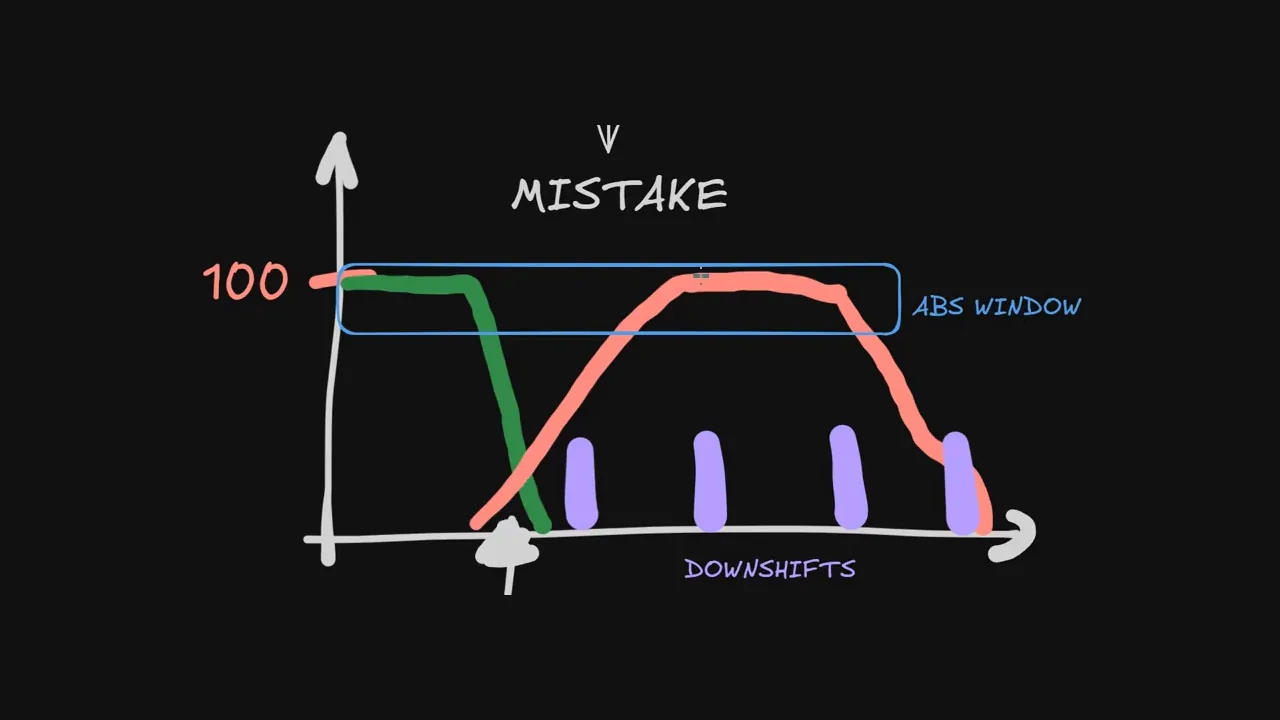
You hit the marker, but peak pressure jumps around. The pedal is probably not repeatable, or you are not braced. Check that you can hold the force, that nothing on the rig moves, and that your heel stays planted with the ball of your foot on the pedal. A stop where pressure drops and then climbs again points the same way. Read 5 Sim Racing Brake Pedal Tips I Wish I Knew Sooner and Why Your Lap Times Are Inconsistent (Cause 7).
Consistent, but always early or always late at turn-in. Good news: you are repeating the stop. The marker is in the wrong place for you in this car. Always late, move it earlier. Always early, move it later. Move it one small step (one board, or five metres), drive it five times, and keep it only if the exit stays clean. Read How to Brake Later in Sim Racing Without Ruining the Corner (Step 6).
Three in a row and most of the ten? Take it into full laps and see if it holds with the rest of the lap around it. Then run the eight-step pass in 5 Sim Racing Braking Mistakes a Coach Spotted in One Lap over one lap to find the next habit. How to Practice Sim Racing Effectively shows how to build that into a session.
Keep this sheet, run the same corner next week and compare the pass rate; if you want a second pair of eyes on it, Academy coaches review your laps.
This guide is part of the free library at GitGud Racing Academy — an online sim racing academy built around weekly lap reviews, structured courses, drills and training tools.
Train this the right way
Reading is step one. Build it into muscle memory with structured, car-specific courses and personal lap reviews from a coach — inside the Academy.
Join the Academy · $39.99/mo incl. VAT