Sim Racing Setup Tool: Fix Understeer & Oversteer
This sim racing setup troubleshooter turns a handling problem into an ordered list of setup changes for a specific car. You choose three things: the car, what you want the car to do (more rotation, less rotation, better traction, a quicker response, more stability over bumps, more straight-line speed or a wet setup) and, where it applies, the corner phase where the problem shows up: entry, mid-corner or exit. The tool returns the setup changes to try in order, biggest effect first, with the setting to move, the trade-off each change creates and a Learn More explanation of what that setting does on that car.
It is narrower than a universal setup guide, on purpose. It covers two cars, and every plan comes from real setup data for those two cars rather than from a generic setup chart.
Which cars and sims the troubleshooter supports
| Car button in the tool | Built from | Sim |
|---|---|---|
| Touring Cars | Toyota GR86 setup data | iRacing |
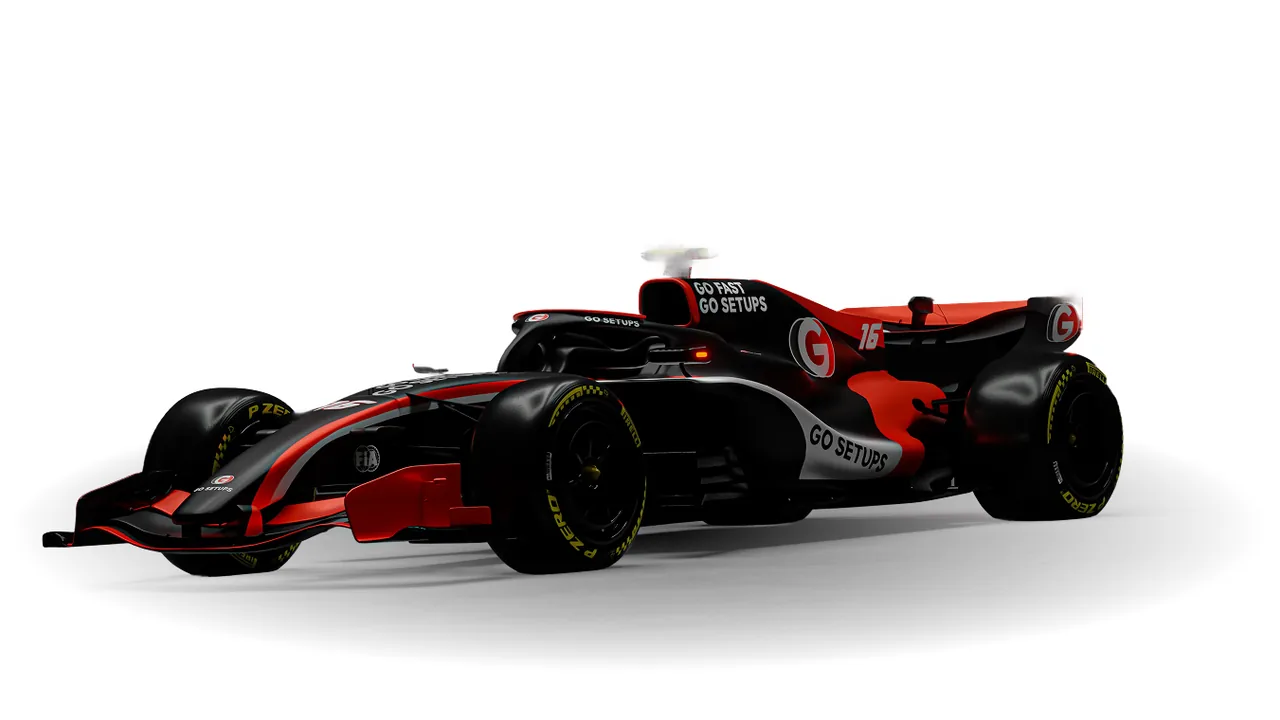
| Formula Cars | Super Formula Lights setup data | iRacing |
- Exact for those two cars only. The clicks, sizes and values (for example a differential preload of 15 Nm) belong to that car in iRacing. On another touring car or open-wheeler, use the reasoning and the trade-offs, not the numbers.
- Other sims are not covered. Settings, scales and their direction differ between sims, and sometimes between cars in the same sim.
- It assumes the problem is repeatable. It does not check your driving. That is what the setup-or-driving check and the baseline below are for.
- Braking instability has no option of its own. Brake bias appears where it belongs to a goal, such as the formula car's entry-rotation plan.
Make them in this order, one at a time. Biggest effect first, then drive it before the next one.
From the GITGUD setup knowledge base.
Academy members have the same tool for more iRacing cars.
Jump to what each option covers, a worked example, diagnosing by corner phase, the adjustment table or building a repeatable baseline.
What each option covers, and where each car starts
The same problem starts from a different setting on each car. The first card below is the one the tool shows at the corner phase it opens on; changing the phase can reorder the plan.
| Option | Pick it when | Touring Cars: first change | Formula Cars: first change |
|---|---|---|---|
| More Rotation | The car won't turn enough / understeers | Soften the front anti-roll bar (mid-corner) | Take the differential preload down to 15 Nm (entry) |
| Less Rotation | The tail is too eager or the car feels nervous | Firm the front anti-roll bar (mid-corner) | A technique check first: what the race trim already freed up (entry) |
| Better Traction | The rear breaks loose or spins as you get on power | Technique first: throttle application (exit) | Set the differential package to the pack default (exit) |
| More Responsive | The car feels lazy or slow to take a steering input | Soften the front bar (entry) | Add front toe-out (entry) |
| Over Bumps | The car is unsettled on kerbs and bumpy sections | Soften bump damping all round (entry) | A driving decision first: this car is not set up for kerbs (mid-corner) |
| Straight-Line Speed | You are losing out on the straights | Less rear wing (whole lap) | The shortest gear stack that does not over-rev (exit) |
| Wet Session | You need to convert a dry setup for rain | Wet tyres, pressures left alone (whole lap) | Fit the wet tyre (mid-corner) |
Some cards are not setup changes at all. Where the most likely cause is the driver, the tool says so first, for example on the touring car's exit traction plan, which starts with how you squeeze the throttle.
Worked example: mid-corner understeer in the touring car
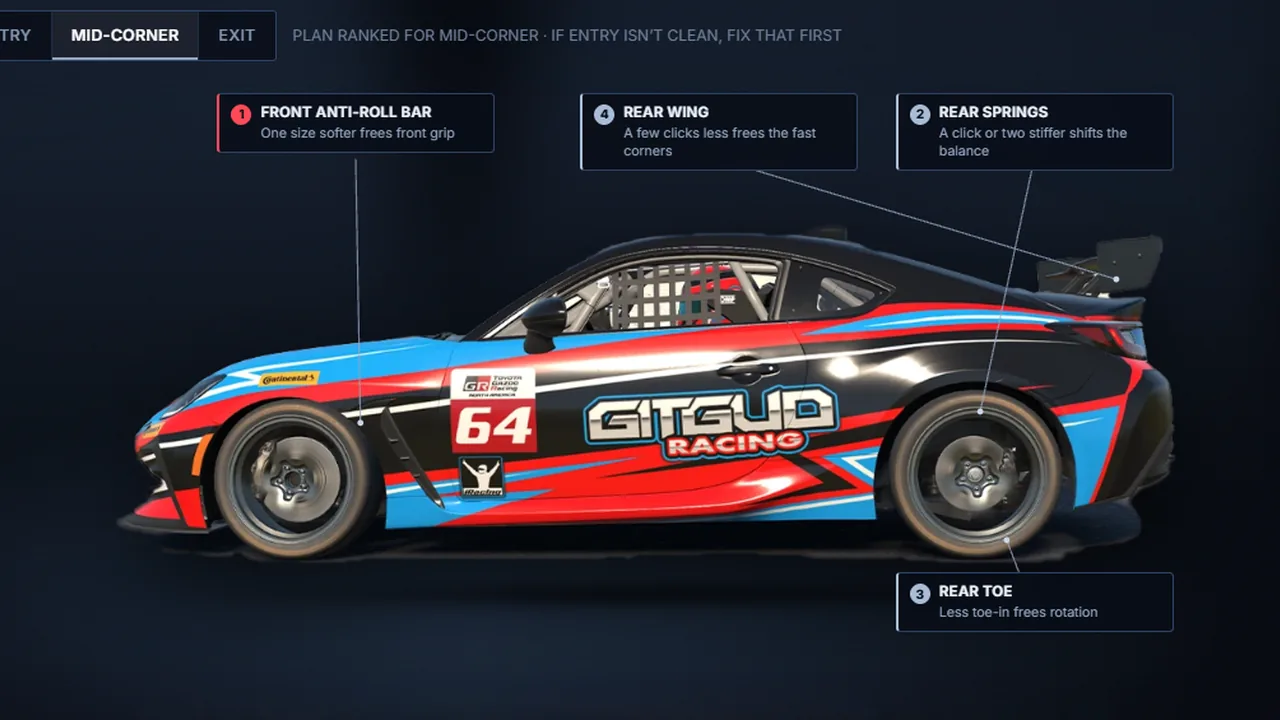
This is the plan the tool gives for Touring Cars → More Rotation → Mid-corner, followed from symptom to result.
- Symptom. The car runs wide through the middle of the corner. It is not the turn-in or the throttle; the front washes out while you hold a steady steering angle, and it does it in several similar corners.
- Driving check. The tool labels this plan "if entry isn't clean, fix that first". Make sure the push is not carried in from the entry (too much speed, or still too much brake at turn-in) and that you are not adding steering after the front tyres are saturated. If it survives several clean laps, it is a setup question.
- Adjustment. Card 1: soften the front anti-roll bar, from the Stiff size to the Soft size. The Learn More panel adds a car-specific warning: trust the size names, because the numbered bar setting's direction is not reliably mapped on this car.
- Expected effect. Less front roll stiffness leaves the front tyres more grip at maximum lateral load, so the car finds rotation in the middle of the corner. The factory car ships the stiff bar as an understeer guard; the race trim the tool is built from runs the soft bar at every track.
- Trade-off. More body roll, and a car that is a touch less crisp in quick left-right transitions.
- Result. Save the setup under a new name, make only this change and run three clean laps, as the tool's own loop says. Keep it if the mid-corner push is smaller and nothing new has appeared. If the softer bar stopped helping or made the car worse, you are past the grip peak: go back. If it helped but not enough, move to card 2.
The rest of that plan, in order: stiffen the rear springs a click or two and then re-set the rear ride height, because in this sim a spring-rate change always moves the ride height (trade-off: a livelier rear on power and harsher kerbs); take a click or two of rear toe-in out, never past zero (less stable under braking and on exit); and, for fast corners only, a few clicks less rear wing (less rear security in exactly those corners, and no help in a slow-corner push).
Pick Formula Cars → More Rotation → Entry instead and the plan has nothing in common with the touring car's: take the differential preload down to 15 Nm from the factory 50 Nm, then move the brake bias nine clicks rearward to 53.5% from the factory 58.0%, then add about 0.7 mm more front toe-out. The same complaint, three different first moves, which is why the tool works car by car.
How to diagnose a sim racing setup problem
Before changing the setup, identify what the car is doing and when it happens. "The car understeers" is not enough information. Understeer while braking into a corner can have a completely different cause from understeer when you accelerate out of it, and reaching for the same setup change in both cases can fix one problem while making another worse.
| Handling problem | Corner phase | Check first |
|---|---|---|
| Understeer | Entry / turn-in | Entry speed, brake release, brake bias and coast-side differential |
| Understeer | Mid-corner | Steering saturation, racing line, anti-roll bars, springs and aero balance |
| Understeer | Exit | Throttle timing, power differential and how quickly the front is unloaded |
| Oversteer | Entry / braking | Brake release, rear stability, brake bias and coast differential |
| Oversteer | Mid-corner | Steering input, roll stiffness, springs and aero balance |
| Oversteer | Exit / power | Throttle application, power differential, rear toe, rear suspension and traction control |
These are areas to investigate, not universal setup fixes. Not every car exposes every setting, and the same adjustment can have a different effect depending on the car, the setup range and the simulator.
How to fix understeer in sim racing
Understeer means the front tyres can't create enough rotation for the speed and inputs you're asking of them. The correct fix depends heavily on when it happens.
Entry understeer is often worth checking in the driving first. Too much entry speed, holding too much brake at turn-in, or releasing the brake in the wrong way can overload the front tyres before a setup change has any chance to help. The way you release the brake into a corner is one of the most common causes, and the car can't tell the difference between too much brake pressure at turn-in and a genuine front-grip problem.
Mid-corner understeer is where front-to-rear balance changes such as anti-roll bars, springs or aero balance become more relevant, but first make sure you aren't simply adding steering after the front tyres are already saturated, which adds slip angle rather than rotation.
Exit understeer often appears or becomes more obvious as the throttle is applied and load moves rearward. Throttle timing and differential behaviour matter much more here than they do for the same understeer felt at the apex. Anti-roll bars and springs work by changing how load moves around the car, not by adding grip directly, which is why the same change helps one car's balance and does little for another's.
The rule that holds across all three: diagnose the phase before changing the setup.
How to fix oversteer in sim racing
Oversteer means the rear tyres are reaching their useful grip limit before the front, so the car rotates more than you intended. As with understeer, the corner phase tells you where to look.
Entry oversteer can come from an unstable brake release, aggressive weight transfer, rearward brake bias, or a setup that allows too much rotation on coast. If a small amount of entry oversteer is something you want rather than something to remove, that is driving technique, not setup, and how to induce oversteer on purpose covers it. Moving brake bias rearward trades braking stability for rotation: useful in small doses, unstable if you push it too far.
Mid-corner oversteer points more toward the car's steady-state balance, although excessive steering or a poor line can still create it.
Exit oversteer happens under power. Throttle application comes first, then whichever of the differential, rear toe, rear suspension and traction control the car actually lets you adjust.
If it happens in only one corner, reproduce it several times before changing the setup. Line, entry speed and throttle application may be creating the problem.
Sim racing setup adjustment table: what each setting changes
Use this as a quick reference for what each garage setting mainly changes. It tells you where to look, not which way to move it: the direction, the size of a sensible step and even whether the setting exists depend on the car and the sim.
| Setup adjustment | Mainly affects | Depends on the car |
|---|---|---|
| Brake bias | Braking stability and corner-entry rotation | The right range depends on the car's weight distribution, aero and ABS. The formula car's entry-rotation plan moves it rearward; none of the touring car's plans touch it. |
| Anti-roll bars | Front-to-rear roll stiffness balance and cornering balance | Some garages offer bar sizes, some numbered settings, some both, and the numbering does not always run in an obvious direction. |
| Springs | Ride control, mechanical balance, kerb compliance and platform support | On some cars a rate change also moves the ride height, which then has to be reset. The touring car uses its rear springs as a main balance lever; the formula car's plans leave the rear springs alone. |
| Differential | Rotation on entry/coast and traction/rotation under power | Some cars adjust coast and power separately, some offer preload and clutch plates, some offer no adjustment at all. |
| Rear toe | Rear stability, response and some straight-line drag | Move it in small steps. The touring car's plans never take the rear past zero into toe-out. |
| Rear wing | High-speed rear stability and aerodynamic drag | Matters most in fast corners and on cars with meaningful downforce; it does little for a slow-corner problem. |
| Ride height / rake | Ground clearance, aero platform and aerodynamic balance | Matters most on a downforce car run low to protect its aero platform, such as the formula car. |
| Traction control | Wheelspin and power-oversteer management | Not every car has it; where it exists, the number of steps and what each step does vary. |
| Dampers | How quickly the car responds during transient load changes | Some cars expose bump and rebound per corner, some far less. The factory setting is not always balanced front to rear. |
Is it the setup or your driving?
Before changing the car, reproduce the problem over several clean laps. If the same behaviour appears repeatedly, in similar corners and in the same corner phase, a setup change becomes more plausible. If it happens in only one corner, disappears when you change your entry speed, or varies dramatically with brake and throttle application, investigate the driving first.
A setup change made to compensate for a technique problem can make one corner feel better while making the car worse everywhere else. Three common examples:
- Too much entry speed can feel like front-grip or setup understeer.
- Adding steering after the front tyres are saturated creates more slip rather than more useful rotation.
- Aggressive throttle application can look like an exit-traction problem even when the setup is capable of putting the power down.
A good setup should make the car easier to use at the limit; it should not be used to hide a repeatable technique error. The guides on braking mistakes, driving at the grip limit and weight transfer each cover one of these in depth. If it is the driving, the class matters too: the GT3 sim racing guide and the Formula sim racing guide cover the technique each kind of car actually rewards.
How to build a repeatable baseline before you change anything
A setup change can only be judged against laps you can repeat. The tool's own rule of thumb is lapping within about half a second of yourself, but there is no single lap-time spread that suits every car and track: a long lap spreads more than a short one, and fuel load, tyre temperature and track conditions all move the clock. What matters is that your normal variation is smaller than the change you are trying to measure.
- Fix the conditions. Same car, track, fuel load and tyres, and the same session conditions for both runs.
- Save the baseline. Keep the setup you start from under its own name so you can always go back to it.
- Drive it until the laps settle. Note how far your clean laps spread, and in which corners and phase the symptom appears.
- Change one thing. Save it under a new name and run the same number of clean laps.
- Judge the symptom, not one lap. Did the problem shrink in the corners where it appeared, and did anything new appear? If your spread is larger than the difference between the two runs, the clock cannot tell you; compare the corner itself, ideally in telemetry.
If your laps never settle, the honest answer is the one in the tool's loop: it is seat time, not setup. Why your lap times are inconsistent covers where that spread usually comes from.
How the setup recommendations are built
Generic setup charts reduce handling problems to rules meant to work across many different cars. This tool starts from each supported car's real setup files compared against its factory baseline: which settings the race setups actually change, how consistently, and in which direction. For the formula car that is thirteen dry setup sheets. Those differences become the ordered plans.
That is also why the recommendations are car-specific. A differential, spring or aero change that works on one chassis is not automatically the right answer on another. Open Learn more on any recommendation to see what the setting does, why the change affects that particular car, and the trade-off to watch for.
Should you copy someone else's sim racing setup?
A faster driver's setup can be a useful baseline, but it doesn't automatically solve your handling problem. A car that rotates perfectly for a driver with a smooth brake release may feel unstable to someone who carries more brake into the corner.
Use another setup as a starting point, then diagnose what the car does with your inputs. If you change anything, make one adjustment at a time and judge it over several repeatable laps rather than by whether one corner immediately feels better. Use telemetry to establish that the problem is repeatable in your own traces; a balance issue that only appears on some laps is usually a driving issue.
If you want a professionally engineered baseline rather than a random download, GO Setups is the service we recommend — setups built per car and track, with a free tier worth trying before you pay for anything. Our GO Setups discount code page covers what each plan includes; the partner code takes 10% off a subscription:
10% off your GO Setups subscription
GITGUD
Enter the code at checkout and check that the discount appears before paying.
Sim racing setup FAQ
Which cars and sims does the setup troubleshooter support?
Two iRacing cars: the Touring Cars button is built from Toyota GR86 setup data and the Formula Cars button from Super Formula Lights setup data. The exact clicks and values apply to those cars only; on other cars or sims, use the reasoning and trade-offs rather than the numbers. Academy members have the same tool for more iRacing cars.
What should I change first in a sim racing setup?
Start by identifying the symptom and the corner phase rather than choosing a setting first. Entry, mid-corner and exit problems can have different causes. Make one change at a time, run several repeatable laps, and keep the change only if the behaviour actually improves.
What is the difference between understeer and oversteer?
Understeer happens when the front tyres reach their useful grip limit first, so the car turns less than you ask and runs wide. Oversteer happens when the rear tyres reach their limit first, so the car rotates more than you intended. For setup work, identifying understeer or oversteer is only the first step — you also need to know whether it happens on corner entry, mid-corner or exit.
How do I fix understeer in sim racing?
Diagnose the phase first — entry, mid-corner and exit understeer usually have different causes. Entry understeer is often worth checking in the driving, mid-corner understeer points to anti-roll bars, springs and aero balance, and exit understeer is more about throttle timing and the differential. See how to fix understeer above, then use the tool for the ordered plan for your car.
What setup changes reduce understeer?
It depends on the corner phase. Mid-corner understeer is commonly where anti-roll bars, springs and aero balance become relevant; entry understeer brings brake bias and coast differential into the picture; exit understeer makes throttle application and power differential more important. Use the phase first rather than applying one generic “understeer setup” change everywhere.
How do I fix oversteer in sim racing?
Work out when it happens. Entry oversteer comes from brake release, brake bias and rotation on coast; mid-corner oversteer is steady-state balance; exit oversteer is throttle, differential, rear toe and traction control. See how to fix oversteer above and let the tool rank the changes for your car.
What setup changes give a car more rotation?
More rotation can come from different setup changes depending on where the car refuses to turn. On entry, brake bias and coast differential can affect rotation. Through the middle of the corner, anti-roll bars, springs and aero balance become more relevant. On exit, differential behaviour and rear balance matter more. Identify the corner phase first and change one setting at a time.
How do I improve traction and stop wheelspin on corner exit?
If the driven wheels spin or the rear breaks loose as you apply throttle, start by making sure the problem isn't aggressive throttle application. If the rear still breaks traction consistently, setup areas to investigate include the power differential, rear springs, rear toe, traction control and, in faster corners, aerodynamic balance. The correct change depends on the car, which is why the troubleshooter ranks them separately.
How does the differential affect understeer and oversteer?
The differential changes how the driven wheels are allowed to rotate relative to one another. Its effect depends on whether you're braking, coasting or accelerating, so a differential change that helps entry rotation can behave very differently under power. Treat coast and power behaviour as separate problems rather than assuming one differential setting fixes the whole corner.
What causes understeer on corner entry?
Before changing the setup, check the driving. Too much entry speed, excessive brake pressure at turn-in or a rushed brake release can overload the front tyres and feel exactly like a setup problem. If the behaviour remains repeatable with clean inputs, brake bias, coast differential and the car's entry balance are then worth investigating.
What causes oversteer on corner exit?
Applying the throttle moves load rearward and asks the rear tyres for grip they may not have. The usual culprits are throttle application, the power differential, rear toe, rear suspension and traction control. If the rear only steps out in one corner, repeat it and check your input before changing anything.
Why does my car understeer in slow corners but not fast corners?
If the problem mainly appears in slow corners, look first at driving inputs and the car's mechanical balance: entry speed, differential behaviour, springs and anti-roll bars. Aerodynamic changes such as wing and rake have much less influence at low speed. If the same problem becomes much stronger in fast corners, aero balance becomes more relevant.
Why is my car unstable only in high-speed corners?
A handling problem that grows with speed is a reason to investigate aerodynamic balance as well as the mechanical setup. Rear wing, ride height and rake can change high-speed stability, while a problem that also appears in slow corners is more likely to involve mechanical balance or driver inputs.
Should I change my driving or the setup first?
Reproduce the problem over several clean laps first. If it appears repeatedly in similar corners and the same phase, a setup change is more plausible. If it shows up in one corner, or changes a lot with your entry speed and throttle, fix the driving first. A setup change made to hide a technique habit usually just moves the problem to another corner.
What do anti-roll bars change in a sim racing setup?
They change how much each end of the car resists body roll, which shifts the front-to-rear balance rather than adding grip. Softening the front bar lets the front tyres work harder relative to the rear, reducing understeer; stiffening it does the opposite. Because it is a balance lever, the same change helps one car and does little on another.
Should I change one setup setting at a time?
Yes. Make one meaningful change, run several repeatable laps and compare the car's behaviour before touching another setting. Changing several things together may improve the car, but you won't know which adjustment caused it — or which one created a new problem.
This guide is part of the free library at GitGud Racing Academy — an online sim racing academy built around weekly lap reviews, structured courses, drills and training tools.
Train this the right way
Reading is step one. Build it into muscle memory with structured, car-specific courses and personal lap reviews from a coach — inside the Academy.
Join the Academy · $35.99/mo incl. VAT