How to Drive GT3 Cars Fast in Sim Racing
Driving a GT3 car fast comes down to three jobs in every corner: control the entry speed, coordinate the brake release with the steering, and apply power when the car is ready for it, not before. GT3 cars are heavy, they have much less downforce than a formula car, and they carry ABS and traction control, so most of the lost time is in how those three jobs interact with the electronics. How ABS and TC behave, and what each setting step does, varies by car and by simulator. This page teaches the driving that carries across and hands the settings to the sim guides.
It is the public version of our GT3 Masterclass. Three full lessons from the course are embedded below, along with the instructor's own drawings.
GT3 quick start: where to begin
Pick the problem you have today and start there.
- Losing time under braking. Start with how to brake a GT3, then ABS. The shape of the brake trace, and when you leave the ABS window, matter more than where you brake.
- The car won't turn in, or washes wide. Go to GT3 understeer by corner phase, then how to rotate a GT3.
- Running wide or sliding on exit. Read getting traction on corner exit and traction control.
- Fast one lap, slow the next, or fading over a race. That is consistency rather than GT3 technique: why your lap times are inconsistent, and race pace for holding it over a stint.
- Not sure what the cause is. The troubleshooting table goes from what you notice, to what to check, to what to practise.
One corner, phase by phase
This is how the three jobs line up in a single heavy braking zone into a slow corner, using the instructor's drawing of the three phases. Each step links to the section that explains it.
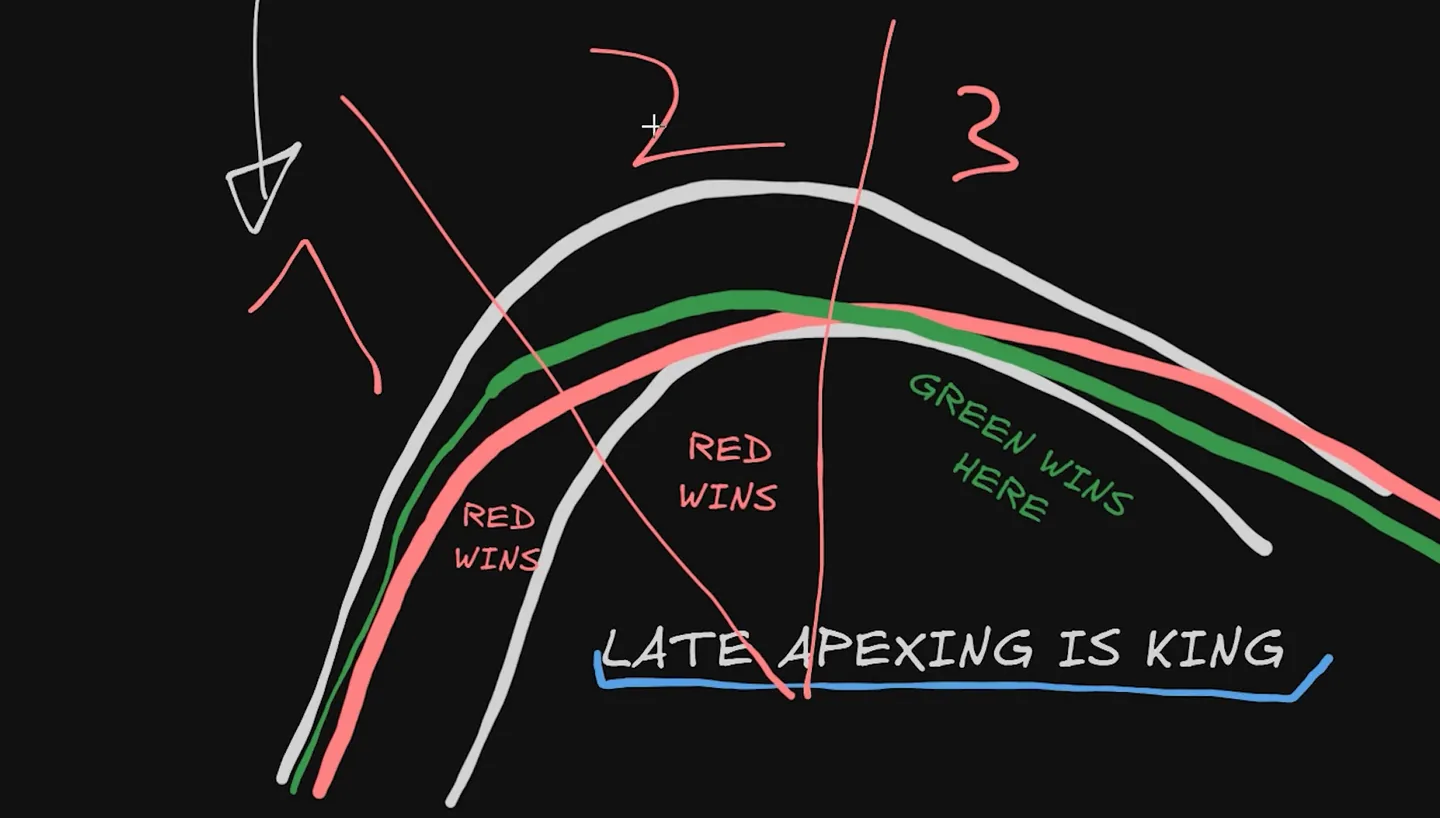
- Straight-line braking (phase 1). Off the throttle, then a quick squeeze to peak pressure with the wheel straight, and hold the peak. A brief touch of ABS here is fine. Check: is the steering close to zero while the pressure is at its peak? (Braking, ABS)
- Release and turn-in (end of phase 1). Add steering only as the pressure starts to fall, and be below the ABS window before the steering goes on. Check: does the car answer straight away, or late and floaty? Late usually means you turned while ABS was still working. (Trail braking)
- Rotation (phase 2). A light trail to the apex and the downshifts point the car; the steering wheel is the last tool, not the first. Check: how much lock you need. If it keeps growing, the car has not rotated. (Rotation)
- Throttle (phase 2 into 3). One committed application from a reference point, often around the middle of the corner or slightly earlier. Check: can you stay flat to the exit without running out of track? (Corner exit)
- Exit (phase 3). Traction control catches the odd overstep, which is most worth having onto a long straight. Check: short TC flashes are fine; a light that stays on means you are sitting over the limit. (Traction control)
What makes a GT3 different to drive
Mass, and the delay that comes with it. Braking hard moves a lot of weight from the rear to the front; cornering adds lateral transfer on top. Because a GT3 is heavy and its suspension relatively soft, that mass moves with a delay rather than instantly. Every input has to be timed to account for that inertia, which is why technique that works in a light car can feel late and clumsy here.
More mechanical grip, less aero. A GT3 does make downforce, and it matters in fast corners, but far less than a formula car. In slow and medium corners you are turning mostly on mechanical grip, which is why the brake release matters so much and why the car usually has to be rotated deliberately rather than simply steered.
ABS and traction control. Both are safety nets: ABS on corner entry under braking, traction control on the initial part of corner exit. Both punish you at either extreme. Abuse them and you are slow; refuse to use them and you are also slow. The skill is finding the window in between.
How to brake a GT3 car
Braking is where most of the time is won and lost in a GT3, and a heavy braking zone has five things to get right: near-zero steering while the brakes are at peak, no brake-throttle overlap, a quick application, a steady held plateau, and a small amount of trail brake at the end. Master three of the five and this type of corner transforms. Why the steering is near zero there, and where it belongs through the rest of the corner in any car, is the general rule in sim racing steering technique; this page is the GT3 shape of it.
Start with the constraint everything else obeys. The grip available to a tyre at any moment is a budget of 100%, shared between steering, braking and accelerating. Under heavy straight-line braking you want the whole budget going into braking, which means no throttle and no steering. Finding the edge of that budget by feel, rather than by locking a wheel, is its own skill — how to find the grip limit covers it.
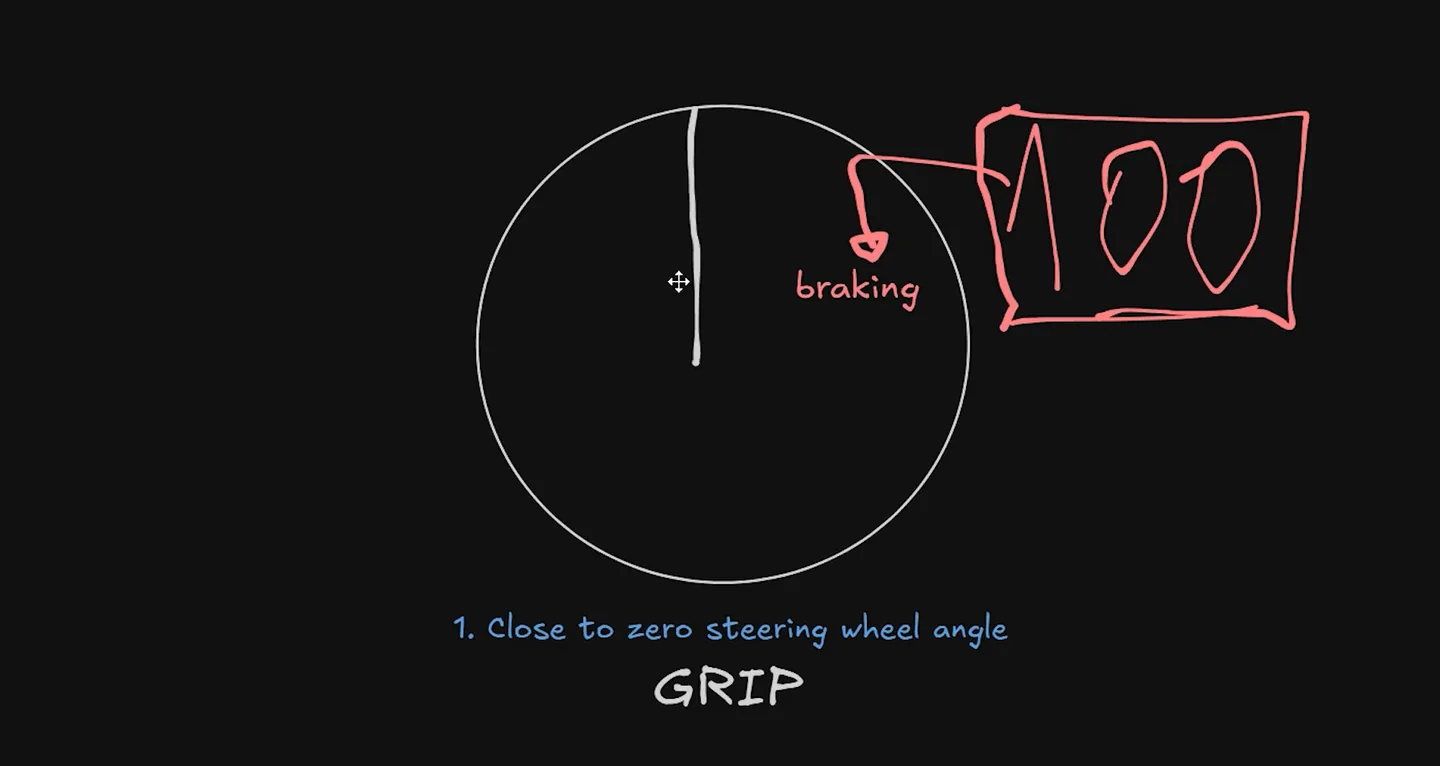
Going from top speed down to a first-gear corner, adding even five degrees of steering means giving up some braking grip. The natural tendency, especially early on, is to start turning as the corner approaches while you should still be braking straight. The fix is blunt: keep the wheel straight, and time your zero steering with your peak brake pressure. Only as the pressure starts to fall do you add steering.
The second item is the cheapest to fix. Get off the throttle, then get on the brake. Overlapping the two dulls the forward weight transfer that gives the front tyres their initial bite, and it overheats the surface of the tyre, which shows up as a slower average over a stint rather than one slow lap. If you watch a professional's trace into a chicane, the throttle goes to zero and only then does the brake come on.
The third is application speed. Two drivers brake at the same point, one reaching peak pressure slightly later: the second cannot stop the car in the same distance, so he ends up either sitting deeper in ABS or braking earlier to compensate. Fast application is a squeeze, not a stab, and it is trainable.
The fourth, the held plateau, is the main ingredient in a GT3 heavy braking zone.
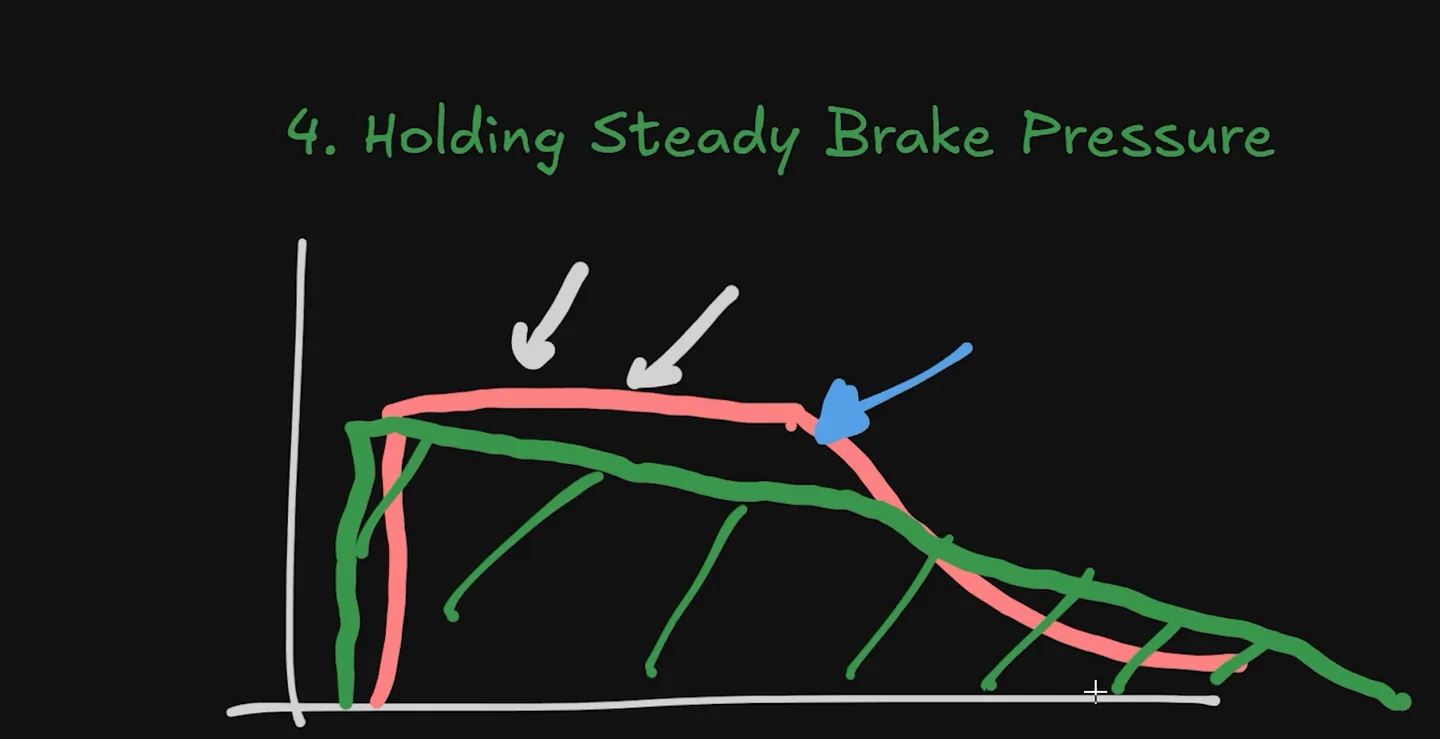
In a heavy braking zone you go hard initially, hold the peak, and only then transition into the trail. If your trace there is a triangle, you usually still had the grip to hold that pressure for longer. There are three common reasons the pressure sags: a driving style carried over from formula cars, plain muscle fatigue, and pedals whose elastomers have aged or overheated and are effectively trail braking on their own. The mental cue that fixes it for most people is to feel as though you are still increasing pressure after the peak. That is deliberately exaggerated; it cancels out the natural tendency to bleed off.
The rectangle is not a universal shape. Hold the plateau only where the grip is constant: elevation change, a crest or a bumpy braking zone are real reasons to modulate. And it belongs to heavy braking zones. As corner speed rises the shape changes: medium-speed corners want something spikier with a shorter plateau, and a genuinely fast corner is often a brief stab rather than a braking zone at all. Match the shape to the corner, and expect it to differ between cars and sims.
ABS in a GT3: when to lean on it, and when not to
The common belief is that fast means never triggering ABS. The truth is more useful and slightly more awkward, so it is worth taking in two halves.
Half one: ABS costs you stopping distance. Two drivers, same car, same conditions, braking at the same point. The one who leans hard into ABS stops later than the one who barely uses it.
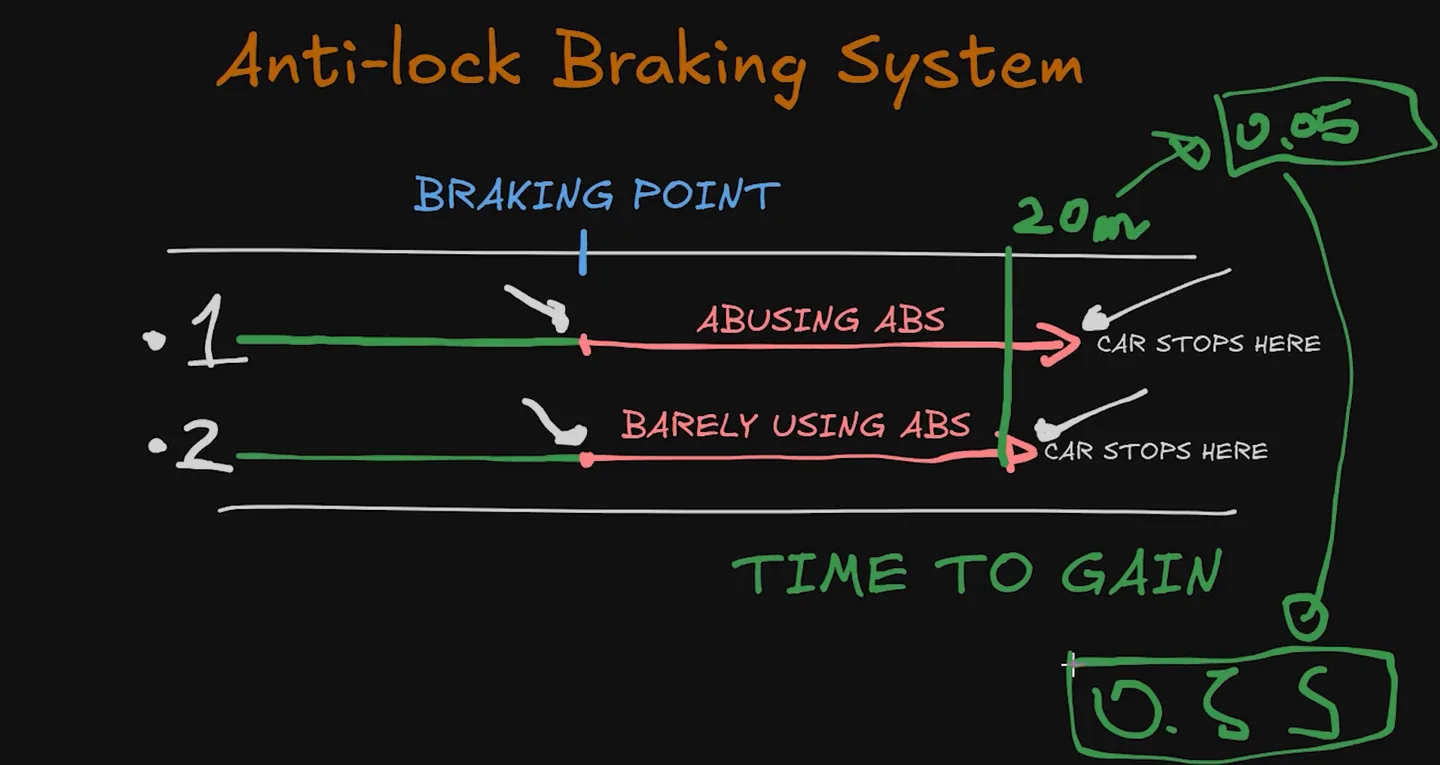
Across ten corners, a difference like that adds up to something you would notice on a lap time. The reason is in the mechanism. Each wheel has a speed sensor; when the system sees a wheel about to lock, it cuts brake pressure on that wheel even though your foot has not moved. The tyre recovers, pressure is allowed back, it is still too much, and it locks again.
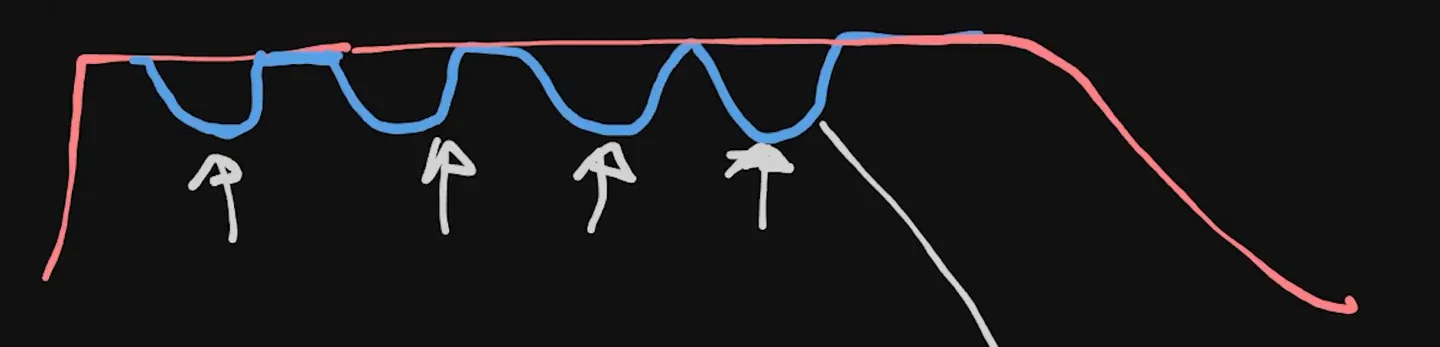
That cycle repeats many times a second, and you never feel the individual cuts. What you feel is a car that will not stop where you expected.
Half two: you should still touch it. A driver who never triggers ABS at all is braking so far under the limit that he is losing more than the ABS would cost. Pixel-perfect braking just below the threshold, every corner, is not realistic for a human. So the practical rule is to treat ABS as a safety net: dip into it, recognise that you are in it, and get back out.
Where that rule changes is the moment you start turning.
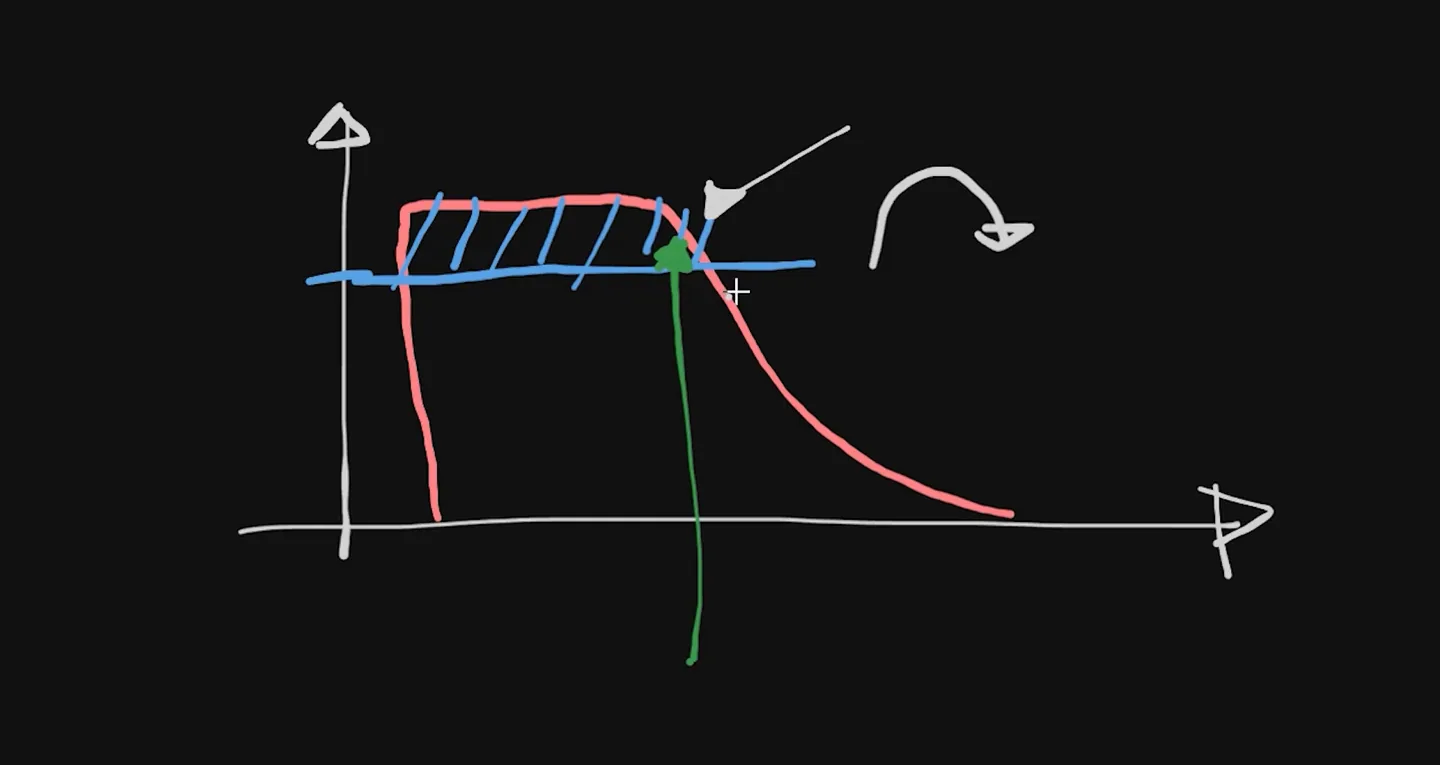
Add steering while the system is still modulating the brakes and the car feels sluggish and turns with a delay. Drivers read that as a setup problem or a front-grip problem, when the cause is the timing of the release. What you want instead is the green trace below: peak at the limit, and already below the ABS window by the time the steering goes on.
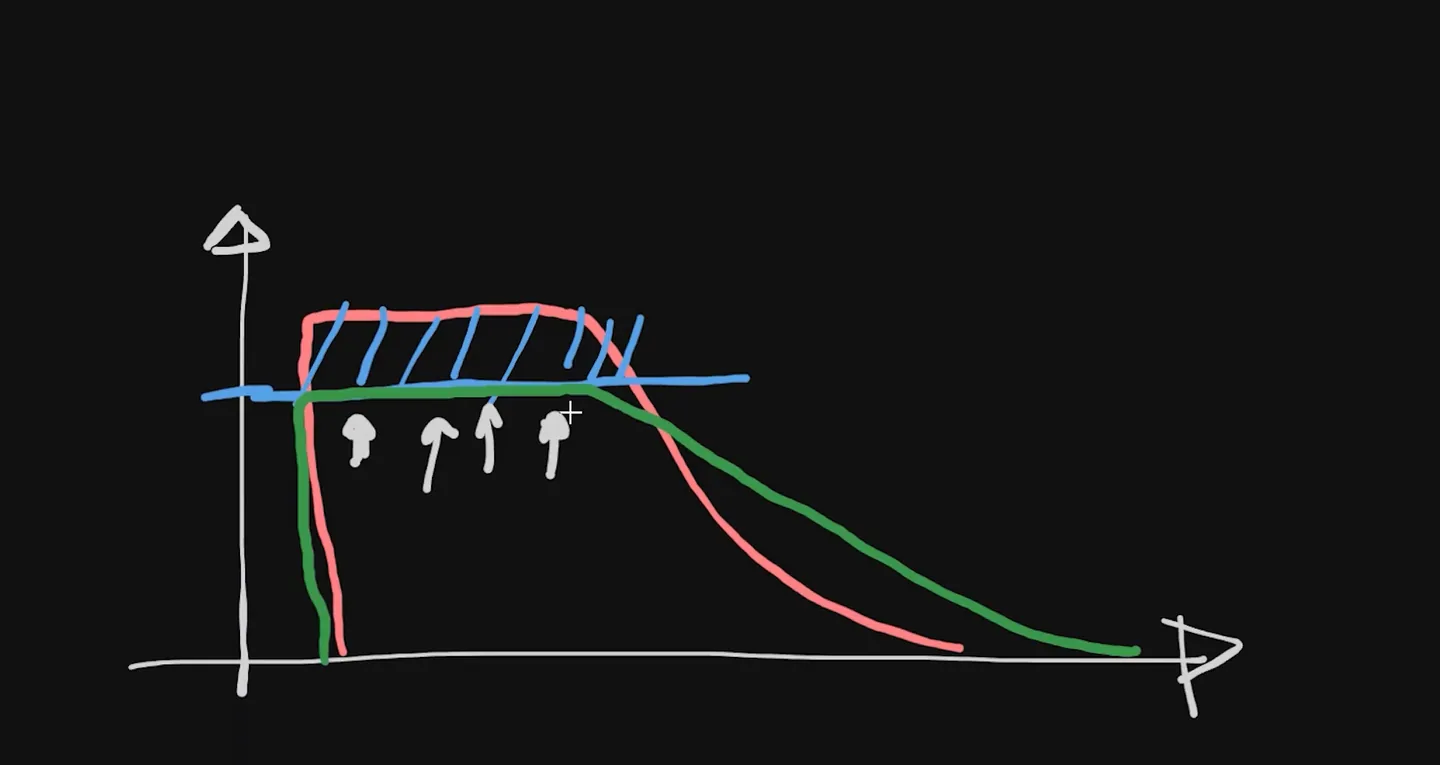
So: lean into ABS over bumps, elevation change and instability (it costs braking but buys the confidence to push, and that usually nets out faster), while you are still learning, and under heavy straight-line braking. Do not lean into it corner after corner, because the repeated micro-locking overheats the tyre surface, and do not lean into it while trail braking or turning.
This is visible in telemetry, and it is worth learning to spot. How to read sim racing telemetry covers reading a GT3 brake trace against a faster lap, including ABS in the trail phase.
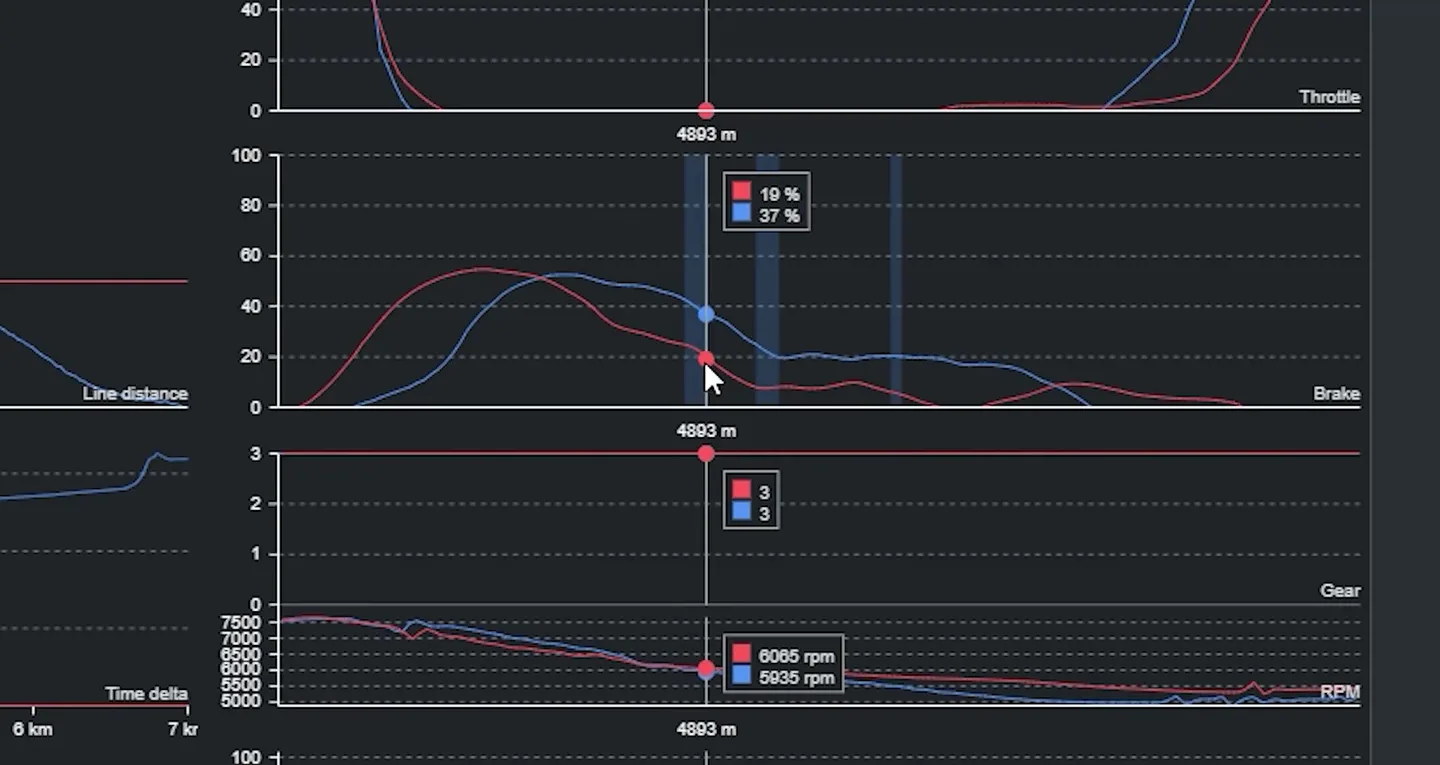
The rule of thumb: ABS activity at the top of the trace is generally fine; ABS activity down in the trail is generally time lost. The threshold is not a fixed pedal percentage. It moves with the car, the corner, the grip available and the way each sim models ABS.
What to watch in this lesson: the ABS cycle drawn under a constant pedal, the two-driver stopping-distance comparison, the turn-in-inside-the-window example, and the telemetry where ABS shows up in the trail.
Trail braking in a GT3
Trail braking is not a GT3-specific technique, but what it does in a GT3 is specific. For the general mechanics — what it is, how to build it, how to fix a release that is too fast — start with the full trail braking guide. What follows is what changes in this car.
Because you have mostly mechanical grip to rotate the car with, the trail is where much of the rotation comes from. The amount is smaller than most people expect: in a heavy braking zone, the course's figure is a trail of under about 10% brake up to the apex. Treat that as a starting point for slow corners in a GT3, not a universal number; it varies with the car, the sim and how your pedal is calibrated.
Push harder than that and a GT3 does something counterintuitive: it understeers. The front is already loaded, and adding more brake pressure past that point overloads it rather than rotating it. So the structure is: brake hard, hold it longer in the top part, and be down to a light trail by the last part of the corner.
The other GT3-specific trap is the one from the ABS section: if the trail is still inside the ABS window when you turn, you get entry understeer that no setup change will fix. And if your release is abrupt rather than progressive, you throw away the front load exactly when turn-in needs it, which produces the same wide, floaty front end. Release slowly and smoothly. Three specific release faults, and how to fix each, are in fix your trail braking.
How to rotate a GT3 car
A GT3's natural state is understeer. It will not rotate on its own, so rotation has to be provoked, and the tools for provoking it are not the ones most drivers reach for.
There are four: downshifts, brake bias, trail braking, and the steering wheel — and the steering wheel is the least effective of them. Try to rotate with steering alone and you are left understeering on exit with one lever left, which is to brake more, and dosing that correctly is very hard: overdo it and the car over-rotates, underdo it and you run wide.
In the course demonstration, adding downshifts and trail braking to the same corner changed the car's behaviour enough to nearly spin it. Brake bias stacks on top: in that demonstration, dropping it a couple of percent just before the braking zone produced noticeably more rotation and a bigger slip angle. That number belongs to the demonstration car and setup and will not transfer to another car or sim; the direction does. The wider mechanics are in the brake bias guide.
In practice, for every corner on the track you decide in advance how much of each tool you will use to point the car where you want it. That is what "rotating the car" means. For the physics of why load transfer produces rotation at all, see weight transfer and the rotation guide.
What to watch in this lesson: the same corner driven with steering alone, then with downshifts and trail braking added, and how much more the car rotates; then the effect of the small brake-bias change.
Traction control in a GT3
Traction control is the corner-exit counterpart to ABS. It senses the rear sliding and limits the slide, which does two useful things: it prevents the spin, and it tells you where the limit is. Trigger it and you know you have just crossed the line, so you can back off. Without it you are guessing, and guessing tends to mean either well over the limit or well under it. Every TC intervention is also a tyre-temperature event, which is why tyre management and TC use are the same conversation over a stint.
The trap is using it everywhere.
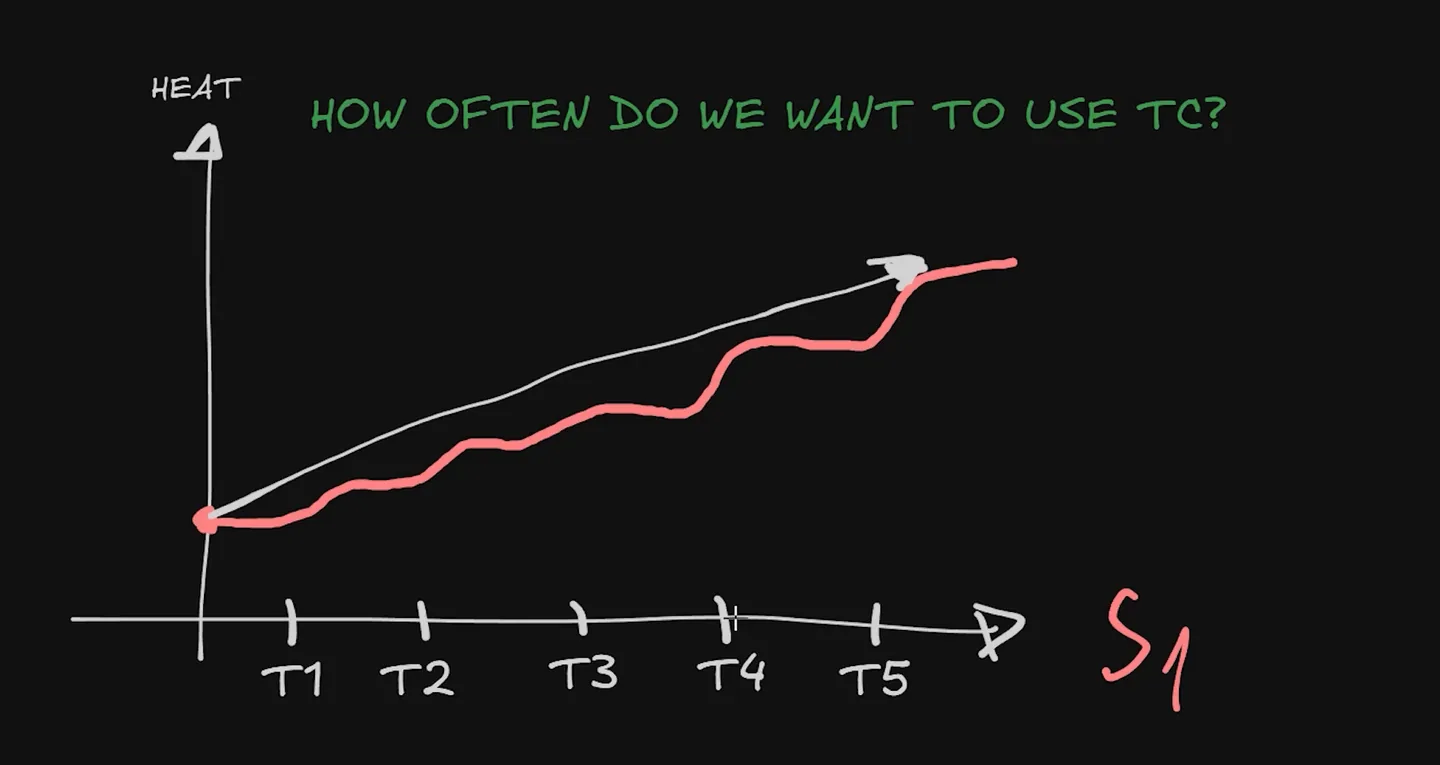
So be selective. Two situations earn it. The first is an exit that leads onto a long straight, where being a fraction earlier and more committed on the throttle is multiplied all the way down the straight. The second is where mechanical grip drops: tricky corners, elevation change, anywhere the car is genuinely on edge.
Everywhere else, repeated intervention overheats the rears and costs pace. And there is a second cost even when the car is not visibly sliding.
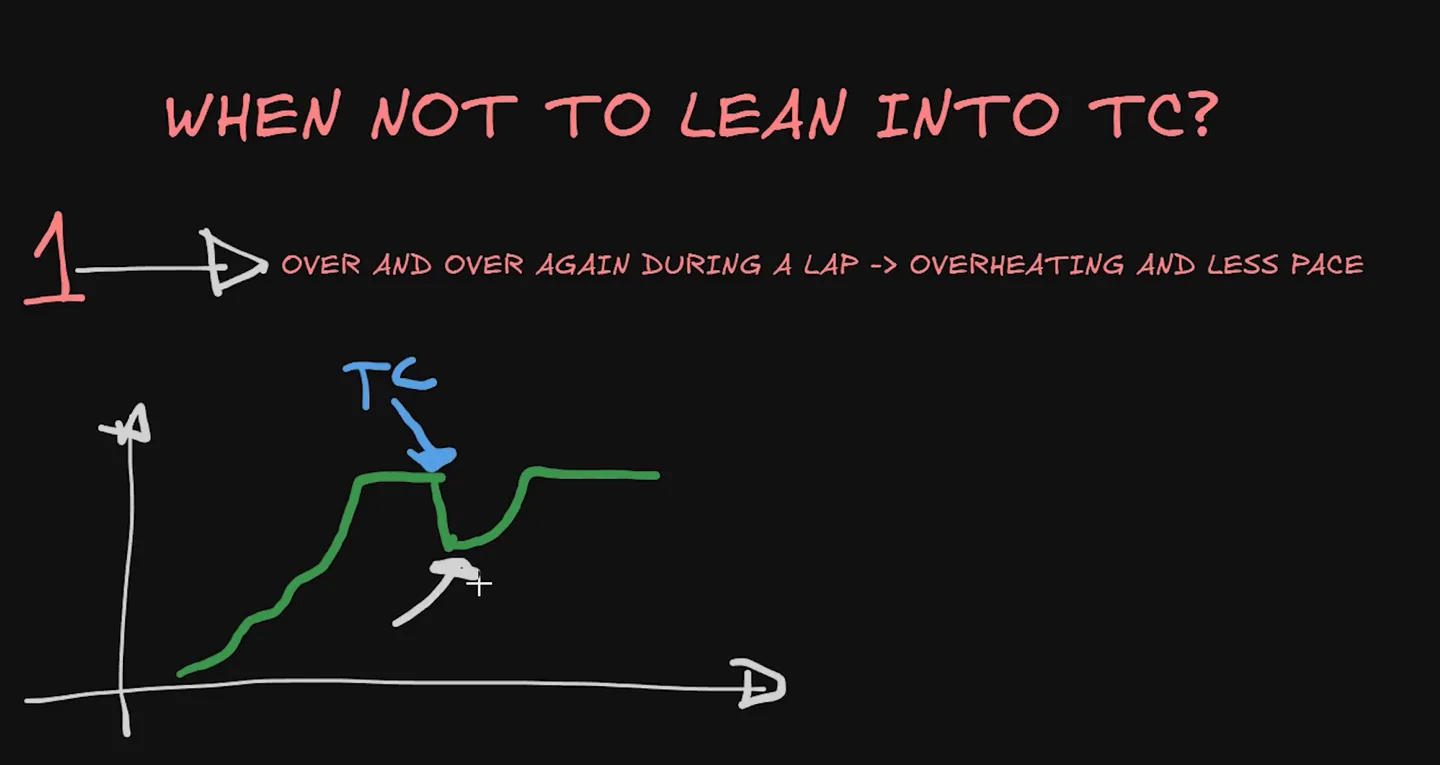
Aggressive throttle or steering can trigger TC without any visible slide, and you still pay for it in that dip. Smooth inputs here are not a stylistic preference; they are how you avoid a cost you cannot see.
How you use it matters as much as where. Watch the dash lights.
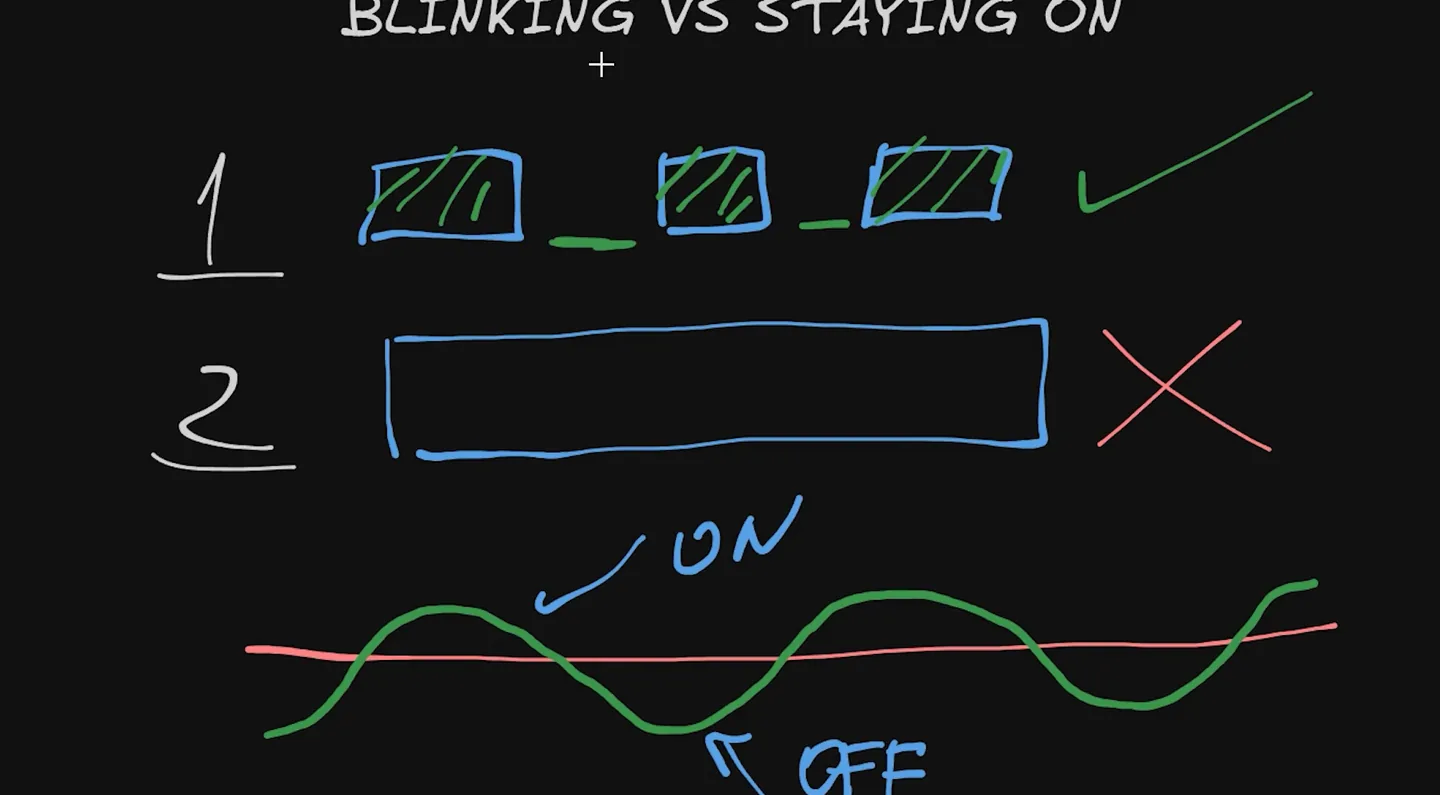
This reconciles the apparent contradiction in the assists question. The ideal is not to trigger the assist at all, but no human holds that precision for a full race. So you go slightly over, recognise it, come back under, and go again. On and off — not on and staying on.
What to watch in this lesson: the tyre-temperature drawing across a sector, which exits earn TC and which don't, the dash LEDs blinking versus staying on, and the throttle cut you never see on the pedal.
Getting traction on corner exit
Traction control is a safety net on exit, not a technique for exit. The technique is throttle timing, and one of the most common ways to lose time in a GT3 is to be early on it.
The failure chain runs like this. You brake too much or too early, so the car feels slow, so you go to the throttle early. The car has not finished rotating, so it stops rotating, so you cannot keep the throttle pinned, and you spend the exit making corrections with your right foot and running out of road. If you are constantly running wide on exit, that is usually the reason: "slow in, fast out" applied without timing.
The fix is a reference point rather than a feeling. In every corner there is a point where you can go from 0% to 100% aggressively without running off the track and without travelling a longer distance. Make the throttle application itself a constant — aggressive, reaching full throttle in the shortest time — and then adjust the braking, the downshifts and the turning until you find that point. As a rule of thumb it sits around the middle of the corner or slightly earlier, because a racing car is better at slowing down than accelerating.
Then calibrate. If the exit feels too easy and you are not using all the track, move the point earlier or commit harder. If you cannot make the corner without running out wide, change the braking or the turn-in point, or move the reference later.
In most GT3 corners, treat the throttle as close to binary: on or off, with modulation only in the first fraction of travel to avoid wheelspin. Chopping between full and zero repeatedly shifts load between the axles and never lets the chassis settle.
The GT3 racing line
Line theory starts the same way it does in any car: use all the track on entry, at the apex and on exit, because the bigger the arc through the corner, the more speed you can carry. In a GT3 there is usually a strong bias on top of that towards a late apex, because the cars are heavy and the exit is worth more than the entry.
The three-phase drawing in the corner example above shows why. The late-apex line gets the car rotated sooner, so where the early-apex line is still pointing at the outside of the track and still braking, the late-apex car is already pointing down the next straight and going to power. How much that is worth depends on the length of that straight, and since most corners lead onto something, prioritising the exit wins far more often than it loses.
Then there is the step beyond it.
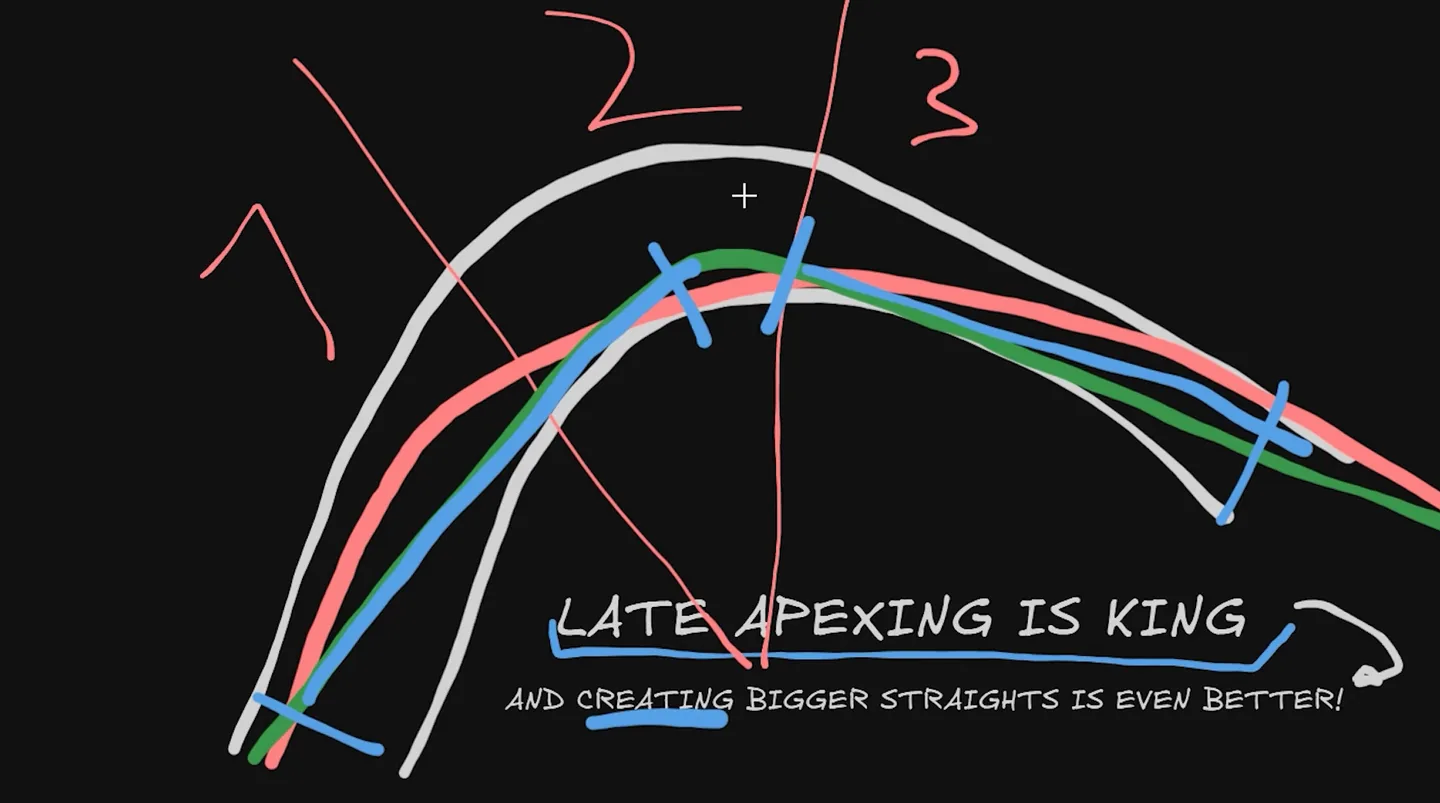
Straightening the entry does three things at once: less steering means less tyre scrub, you can brake later because you are braking in a straight line, and you cover fewer metres. You pay for it with more stress in the middle of the corner. In a heavy car that trade is usually worth it, and it is what separates genuinely quick lines from merely tidy ones. Actually moving the braking point once the entry is straight is a sequence of its own: how to brake later.
Where the entry cannot be straightened — bumps, kerbs you cannot run tight to — the principle survives: keep the wheel as straight as you can and treat long corners as double apexes. In S-sections, resist the urge to swing wide to "prepare" each corner. Snaking costs distance and steering for nothing.
Corner types in a GT3
Naming the corner before you work on it tells you what it punishes. Braking technique in particular changes with corner speed: low-speed corners are where the full five-item braking formula matters most, because the brakes are held longest and hardest there. Medium-speed corners reward the transition. High-speed corners are far more about commitment and a stable platform than about brake shape.
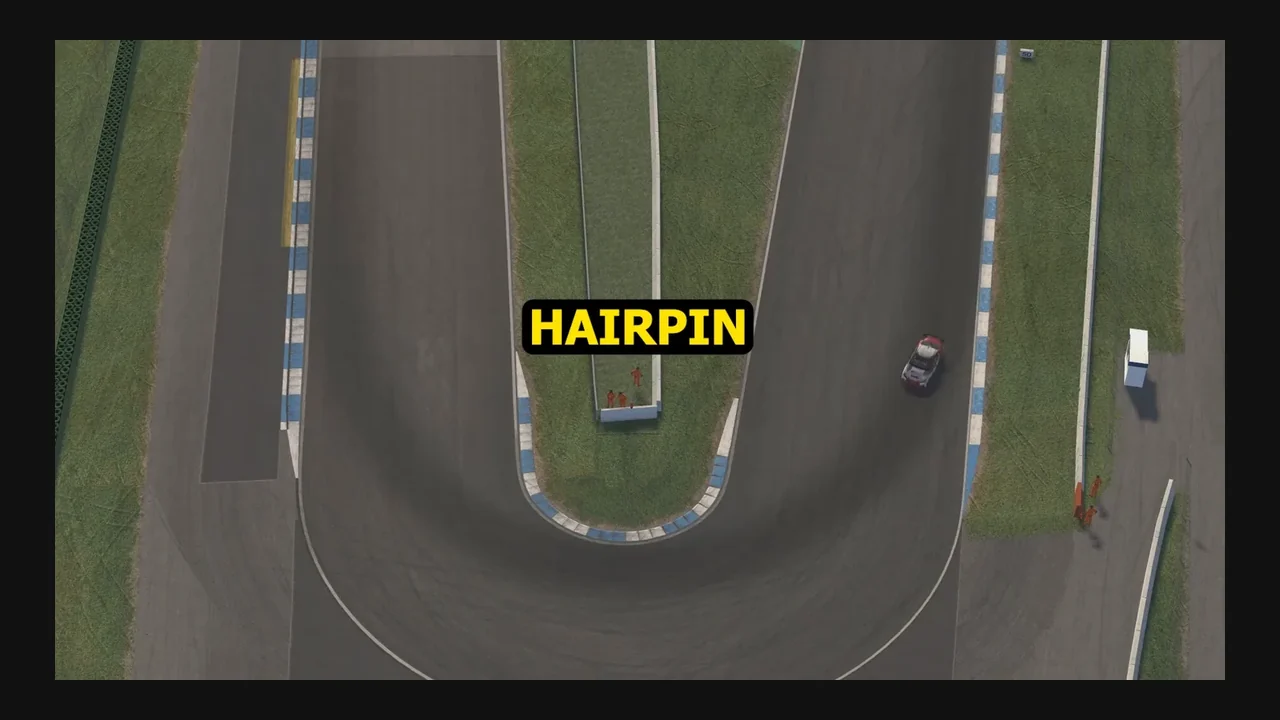
Hairpins are the exception to the steering-lock rule in the mistakes list below: they genuinely need lock. Chicanes reward the shortest possible path and punish over-preparation. Double apexes are where the "make two straights" idea pays most directly. Decreasing-radius corners punish an early apex hardest, because the road keeps tightening after you have committed. Increasing-radius corners let you get to power very early if you are patient enough to wait for the road to open. Each of those shapes, seen from above with the line drawn on it, is in racing corner types; the tight ones have their own guides for hairpins and chicanes. For the general method of breaking a corner down and labelling it, see the cornering guide.
How much ABS and TC should you use?
There is no universal number, because the same setting step does different things in different cars and sims. What does carry across is how to read the intervention:
| What you see | What to check | What to practise |
|---|---|---|
| ABS intervening deeply in every braking zone | Your brake use before your settings: you are braking past what the tyre can take | Dip into ABS and come back out, rather than sitting in it |
| ABS active as you turn in | Whether the pressure is below the ABS window when the steering starts | Release the top of the trace sooner, so you are out of the window before turn-in |
| ABS never triggers | Your peak pressure against a faster lap | Brake harder at the peak until you touch ABS briefly, then come back out |
| TC cutting constantly | Throttle application and steering smoothness on exit | Smoother inputs, and one committed throttle application from your reference point |
| TC light on for a second or more | Whether you are sitting above the limit rather than crossing it | Short flashes with pauses: over, recognise it, back under |
| Repeatedly spinning the rear | Throttle timing first | More traction control may genuinely make you faster and more consistent; that is not a failure of skill |
Sim-specific electronics settings — what each numbered ABS and TC step does, per-car TC1 and TC2 behaviour where a car has both, how each sim exposes them, tyre pressures — belong to the sim, not the car class. Those live in the ACC guide and the Le Mans Ultimate guide.
GT3 understeer, by corner phase
Understeer is the front tyres sliding: past a certain speed they break traction, and more steering angle does nothing except scrub and overheat them. The fix is usually in the pedals, not the wheel. Lift, add a touch of brake, and unwind the steering so the front can take grip again.
The cue arrives before the slide does. As you load the front past its limit, the force feedback gets lighter. Reacting to that lightness is how you avoid understeer instead of correcting it, which matters because correcting it always costs lap time.
Then diagnose by phase:
- Entry. Too much entry speed, too much brake still applied at turn-in, or brake pressure still inside the ABS window when the steering goes on. Check the driving before the setup.
- Mid-corner. Steering saturation is the first suspect: you have added lock past the point where it produces rotation. After that, front-to-rear balance: anti-roll bars, springs, aero balance.
- Exit. Throttle applied before the car has finished rotating, unloading the front exactly when it still had work to do. Differential behaviour matters here more than anywhere else.
And the GT3-specific one that catches people: too much trail brake produces understeer in this car, because the front is already loaded to its limit.
GT3 oversteer, by corner phase
Oversteer is the rear reaching its limit before the front. The phase it happens in tells you most of what you need about the cause.
- Entry / braking. An unstable or abrupt brake release, aggressive weight transfer, brake bias too far rearward, or a setup that allows too much rotation on coast. Lowering bias is a rotation tool; if you moved it, this is the bill.
- Mid-corner. Steady-state balance, though excessive steering or a poor line can create it on their own.
- Exit / power. Throttle application first, then differential, rear toe, rear suspension and traction control.
One diagnostic worth applying before anything else: if the rear only steps out in one specific corner while the car is stable everywhere else, do not rebuild the setup. Repeat that corner and check that your inputs are actually consistent.
Why am I slow in GT3 cars?
If you are quick in other classes and slow in a GT3, the cause is usually one of a small number of things. Find your symptom, check the thing in the middle column, and practise the change on the right before you touch the setup.
| What you notice | What to check | What to practise |
|---|---|---|
| Losing most of your time into the corners | Brake shape in heavy zones: a held plateau, or a triangle that bleeds off? | Hold the peak, with the cue of still adding pressure after it |
| Can't reach the apex, car runs wide on entry | Entry speed, and whether you are rotating with steering instead of the brake release | A progressive release, with downshifts and a light trail pointing the car |
| ABS light on in every braking zone | Braking past the tyre's limit; whether you are out of the window before turn-in | Dip into ABS and back out; be below the window before the steering goes on |
| TC cutting constantly | Throttle application and steering smoothness on exit | One committed application from a reference point, with less steering |
| Front washes wide mid-corner | Steering saturation, then line, then front-to-rear balance | Stop adding lock when the force feedback goes light; unwind and wait for grip |
| Rear snaps on exit | Throttle timing, then differential and rear suspension | Move the throttle reference later until the car is rotated |
| Constantly running out of track on exit | Whether the throttle reference point is too early, before the car is rotated | Keep the application constant; move the reference later or change the braking and turn-in |
| One lap fast, the next slow | References and consistency, not the car | Start with a practice structure |
If the symptom persists with genuinely repeatable inputs, then it is worth looking at the car. The setup troubleshooter takes it from there, phase by phase.
Common GT3 driving mistakes
- Braking later instead of braking better. The gain is usually in the shape of the trace, not the position of the brake point.
- Living in the ABS window. Occasional intervention is a safety net; constant intervention is micro-locking, overheating and lost distance.
- Dumping the brake. Releasing too fast throws away the front load exactly when turn-in needs it. (ACC is the partial exception here; in most sims it hurts.)
- Trying to rotate with the steering wheel. It is the least effective of the four rotation tools, and using more of it saturates the front instead.
- More than about 90 degrees of lock in a normal corner. Usually a symptom of not having rotated the car with braking and weight transfer. Hairpins excepted, and take it as a training constraint rather than a law.
- Throttle before the car is ready. Early on power, unable to commit, correcting all the way to the exit.
- Fighting traction control instead of fixing the input. If the light is on constantly, the throttle or the steering is the problem.
- Copying settings before understanding the driving. A faster driver's setup was built around a different set of inputs.
Worth stating plainly, because it reorders priorities: bad braking with good throttle timing is often faster than perfect trail braking with bad timing. In one comparison the driver who did not trail brake at all, but got his throttle timing right, was a tenth quicker. That is one comparison, not a law, but it tells you where to spend your practice. For what those mistakes look like on a real trace, five braking mistakes a coach spotted in one lap is the worked example.
GT3 vs Formula: what actually changes
Drive a GT3 the way you would a formula car and it will often feel unresponsive, and it is easy to blame the car when the driving style is the problem. The differences below are typical tendencies, mostly in heavy braking zones and slow-to-medium corners; the right shape still depends on the car, the sim and the corner.
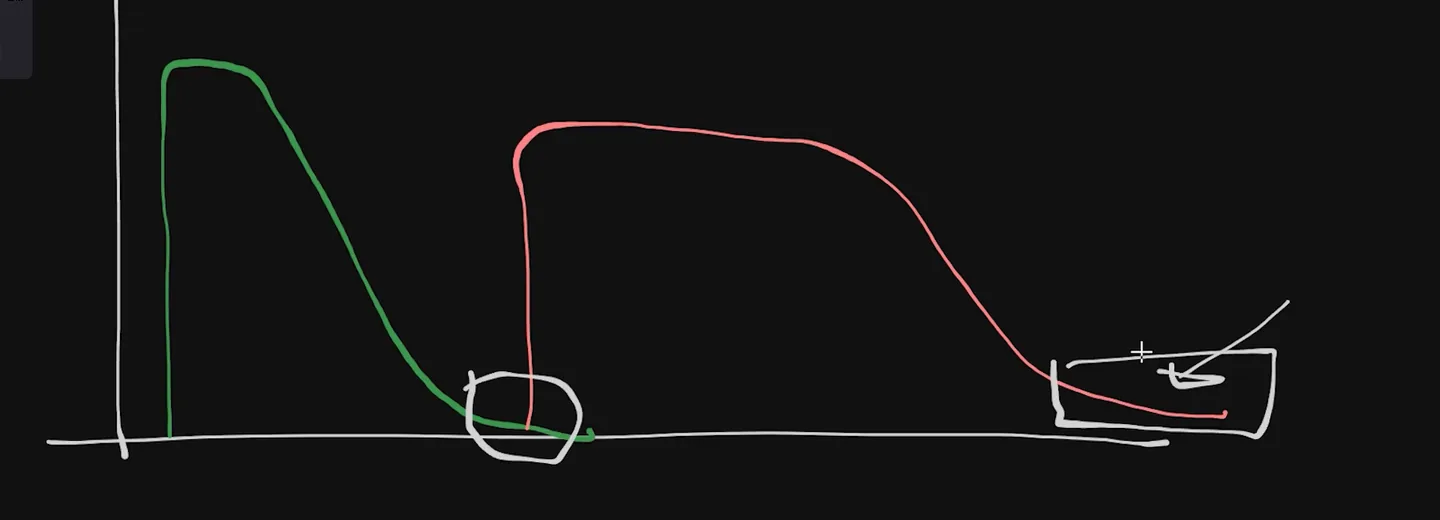
- Brake shape. In a heavy zone, a formula car's trace tends towards a triangle; a GT3's towards a rectangle with a tail.
- Release. A formula car usually comes off the brake more quickly; a GT3 more gradually, with more emphasis on the trail because it has far less downforce to help rotate it.
- Steering. A formula car often builds lock fairly linearly toward the apex; a GT3 often wants less lock early and more as you approach it.
- Line. A formula car tends to favour the shortest distance and tight apexes; a GT3 often favours a wider, V-shaped line with a straighter entry.
- Downshifts. In a formula car, as fast as possible; in a GT3, finished slightly later and timed more carefully, because each one unsettles far more mass.
- Timing. The heavier car has more inertia, so the weight moves with a delay and every input has to anticipate it.
What does not change between the two is the racecraft. A GT3 gives you a longer braking zone to work with and forgives a touch that would end a formula race, but the positioning, the three ways to defend and the habit of setting a pass up a corner before the one where it happens are the same, and they are in sim racing racecraft.
If you are moving the other way, the Formula sim racing guide covers the same ground from the open-wheel side: aero grip, braking without ABS, and why a Formula brake trace has to decay instead of holding. And if the basics underneath both are shaky, the twelve driving techniques come first: car-specific technique built on an inconsistent brake point is a habit, not a skill.
GT3 sim racing FAQ
How do you drive a GT3 car fast?
Brake hard and hold the pressure rather than bleeding it away, get the car rotated with the brake release, downshifts and brake bias instead of steering angle, and be patient with the throttle until the car points at the exit. The two electronic systems are safety nets, not shortcuts: dip into ABS and traction control and come back out, rather than sitting in them.
Are GT3 cars hard to drive?
They are easy to drive slowly and hard to drive quickly. The mass makes weight transfer arrive with a delay, so inputs have to be timed rather than simply applied, and with far less downforce than a formula car there is less aero to help rotate the car for you. ABS and traction control make them forgiving of mistakes while quietly costing lap time when you lean on them everywhere.
Should you use ABS in GT3 cars?
Yes, but as a safety net rather than a resting place. Triggering ABS costs braking distance, yet a driver who never triggers it at all is braking far under the limit and losing more. Lean on it over bumps and under heavy straight-line braking; avoid it corner after corner, and get the pressure below the ABS window before you turn in. Full explanation with the drawings.
Should you use traction control in GT3 cars?
Selectively. It earns its place on exits that lead onto long straights, where being earlier and more committed on the throttle is multiplied down the straight, and where mechanical grip drops. Leaning on it in every corner overheats the rear tyres and costs pace, and each intervention cuts delivered throttle even when the car is not visibly sliding. More on when it pays.
How do you brake a GT3 car?
In a heavy braking zone, five things: keep the steering near zero while the brakes are at peak, get off the throttle before the brake goes on, apply quickly with a squeeze rather than a stab, hold that peak pressure instead of letting it sag, and finish with a light trail brake. There the trace usually looks like a rectangle with a tail, not a triangle; in faster corners the shape gets spikier and shorter.
How do you trail brake a GT3 car?
Lightly. In a heavy braking zone the course's starting point is a trail of under roughly 10% brake to the apex, though the exact figure varies with the car, the sim and your pedal calibration. Push harder than that and a GT3 will understeer instead of rotating, because the front is already loaded to its limit. The release also has to be smooth: dumping the brake throws away front load exactly when turn-in needs it.
How do you rotate a GT3 car?
With the brake release, downshifts and brake bias, not the steering wheel. A GT3's natural state is understeer, so rotation has to be provoked deliberately. The steering wheel is the least effective of the four tools, and reaching for more lock once the front is saturated just scrubs and overheats the front tyres. The rotation toolbox.
Why do GT3 cars understeer?
Because it is their natural balance, and because of three common driver causes: too much entry speed, brake pressure still inside the ABS window at turn-in, and steering added past the point where the front tyres can convert it into rotation. In a GT3 too much trail brake also causes understeer rather than curing it. The fix is usually in the pedals: lift, a touch of brake, and unwind the steering.
Why do GT3 cars oversteer on corner exit?
Most often throttle application before the car has finished rotating, then differential settings, rear toe, rear suspension and traction control. If the rear only steps out in one specific corner while the car is stable everywhere else, repeat that corner and check your inputs before changing the setup.
Is GT3 driving different in iRacing, ACC and Le Mans Ultimate?
The core technique carries across: brake shape, rotation, throttle timing and how to read ABS and traction control interventions. What changes is how each sim models the tyres and electronics, and the platform detail, such as electronics settings, tyre pressures and how the assists are exposed per car. Learn the driving here, then take the sim-specific settings from that sim's own guide.
This guide is part of the free library at GitGud Racing Academy — an online sim racing academy built around weekly lap reviews, structured courses, drills and training tools.
Train this the right way
Reading is step one. Build it into muscle memory with structured, car-specific courses and personal lap reviews from a coach — inside the Academy.
Join the Academy · $35.99/mo incl. VAT